I’ve heard the horror stories: a developer woke up to a $72,000 bill from a cloud provider after a misconfigured loop made 2 million API calls overnight. Another startup burned through their $10,000 monthly AI API budget in 48 hours due to a prompt injection attack that triggered recursive calls. These stories circulate in developer communities as cautionary tales, but I’ve seen firsthand how third-party API costs can spiral out of control without proper management.
For small businesses building applications that depend on external APIs, understanding rate limiting and cost management is not optional. In this guide, I share the practical strategies I use to prevent billing surprises while maintaining application functionality.
Understanding API Pricing Models
Different APIs charge differently. I always start by understanding the pricing model to predict costs and identify optimization opportunities.
Common Pricing Structures I Encounter

Per-Request Pricing:
- Charged for each API call regardless of data volume
- Example: $0.001 per request
- Risk: High-frequency applications accumulate costs quickly
Per-Unit Pricing:
- Charged based on resource consumed (tokens, records, compute time)
- Example: OpenAI charging per 1,000 tokens
- Risk: Unpredictable costs with variable input sizes
Tiered Pricing:
- Different rates at different usage levels
- Example: First 10,000 calls free, then $0.01 each
- Opportunity: Stay within lower tiers when possible
Flat Rate with Limits:
- Fixed monthly fee with usage cap
- Example: $99/month for 50,000 requests
- Risk: Overage charges often expensive
Freemium:
- Free tier with paid upgrades
- Example: 1,000 requests/day free, then $50/month unlimited
- Opportunity: Maximize free tier value
Cost Calculation Examples
Scenario: AI-Powered Customer Support Bot
Daily volume: 500 customer conversations Average conversation: 8 message exchanges Tokens per exchange: 500 input + 200 output
Daily token usage: 500 × 8 × 700 = 2,800,000 tokens
Using GPT-4 Turbo ($0.01/1K input, $0.03/1K output):
- Input: 500 × 8 × 500 = 2M tokens = $20/day
- Output: 500 × 8 × 200 = 800K tokens = $24/day
- Monthly cost: ($20 + $24) × 30 = $1,320
Using GPT-3.5 Turbo ($0.0005/1K input, $0.0015/1K output):
- Input: 2M tokens = $1/day
- Output: 800K tokens = $1.20/day
- Monthly cost: ($1 + $1.20) × 30 = $66
Model selection alone creates 20x cost difference for identical functionality.
Rate Limiting Fundamentals
Rate limiting controls how frequently an application calls an API. I pay attention to both provider-imposed and self-imposed limits.
Provider Rate Limits
Most APIs I work with enforce limits to protect infrastructure:
| API | Common Limit | Window |
|---|---|---|
| OpenAI | 3,500 RPM (GPT-4) | Per minute |
| Stripe | 100 requests/sec | Per second |
| Google Maps | 50 QPS | Per second |
500 tweets/day | Per day | |
| Shopify | 40 requests/sec | Per second |
Handling Provider Limits:
When limits are exceeded, APIs typically return:
- HTTP 429 (Too Many Requests)
- Retry-After header indicating wait time
- Rate limit headers showing remaining quota
Exponential Backoff Implementation:
import time
import random

def call_api_with_retry(api_function, max_retries=5):
    for attempt in range(max_retries):
        try:
            return api_function()
        except RateLimitError:
            if attempt == max_retries - 1:
                raise
            wait_time = (2 ** attempt) + random.uniform(0, 1)
            time.sleep(wait_time)
Self-Imposed Rate Limiting
Beyond provider limits, I always implement application-level controls:
My Reasons for Self-Limiting:
- Cost control (stay within budget)
- Fair usage across users
- Prevent runaway processes
- Maintain consistent performance
Implementation Patterns:
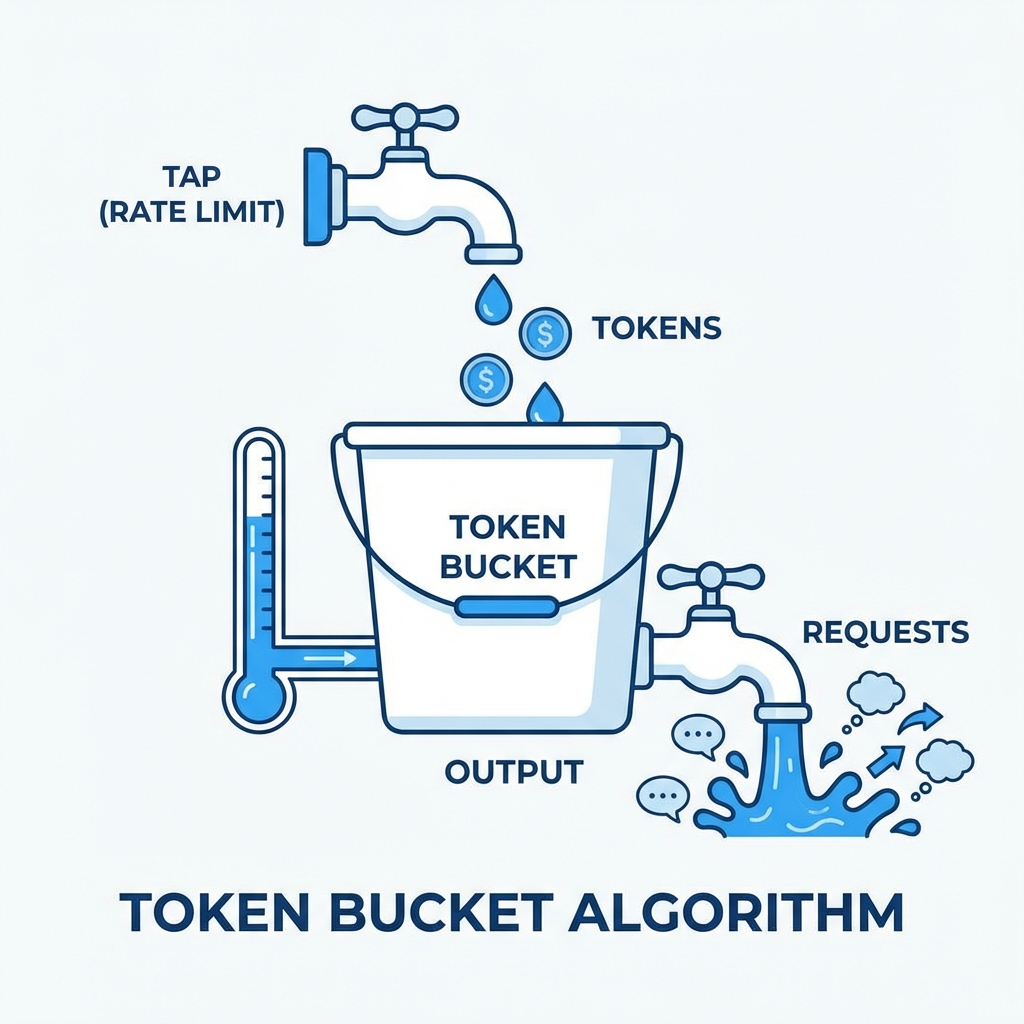
Token Bucket:
- Tokens accumulate at fixed rate
- Each request consumes tokens
- Requests wait or fail when bucket empty
Sliding Window:
- Track requests in rolling time window
- Smooths out burst handling
- More accurate than fixed windows
Leaky Bucket:
- Requests queue and process at fixed rate
- Smooths traffic to downstream services
- Good for rate-sensitive APIs
Caching Strategies for Cost Reduction
Caching reduces API calls by storing and reusing responses. I’ve seen effective caching cut costs by 50-90% for appropriate workloads.
Cache-Appropriate API Calls
Not all API calls benefit from caching. Here’s how I categorize them:
| ✅ Cache-Friendly | ❌ Cache-Unfriendly |
|---|---|
| Reference data (lookups) | Real-time prices |
| User profiles | Fraud detection |
| Product catalog | Transaction processing |
| Geographic data | Authentication |
| Historical analytics | Current inventory |
Caching Implementation Options
In-Memory Cache (Application Level):
Simple, fast, but limited to single instance:
from functools import lru_cache
from datetime import datetime, timedelta

@lru_cache(maxsize=1000)
def get_product_details(product_id):
    return external_api.fetch_product(product_id)
Distributed Cache (Redis/Memcached):
Shared across application instances:
import redis
import json

cache = redis.Redis(host='localhost', port=6379)

def get_cached_data(key, fetch_function, ttl=3600):
    cached = cache.get(key)
    if cached:
        return json.loads(cached)

    data = fetch_function()
    cache.setex(key, ttl, json.dumps(data))
    return data
CDN Caching:
For API responses served to browsers:
- Cloudflare, Fastly, or CloudFront
- Cache-Control headers determine behavior
- Geographic distribution improves latency
Cache Invalidation Strategies
Time-Based (TTL):
- Set expiration time on cache entries
- Simple but may serve stale data
- Good for data with known update frequency
Event-Based:
- Invalidate when source data changes
- Requires webhook or notification system
- More complex but more accurate
Hybrid:
- Short TTL for freshness
- Event invalidation for critical updates
- Best of both approaches
Measuring Cache Effectiveness
I track cache performance to optimize configuration:
Key Metrics I Monitor:
- Hit Rate: Percentage of requests served from cache
- Miss Rate: Requests requiring API calls
- Stale Rate: Requests served from expired cache
- Eviction Rate: Cache entries removed for space
Target Benchmarks:
- Cache hit rate above 70% indicates effective caching
- Hit rate below 50% suggests cache configuration issues
- Zero hit rate means caching is not functioning
Cost Monitoring and Alerting
Prevention beats reaction. My monitoring systems catch problems before they become expensive.
Essential Monitoring Setup
Metrics I Track:
| Metric | Alert Threshold | Action |
|---|---|---|
| Daily API spend | > 50% of budget | Review usage |
| Hourly request rate | > 2x normal | Investigate spike |
| Error rate | > 5% | Check integration |
| Cost per action | Above target | Optimize flow |
Budget Alert Configuration

Most API providers offer built-in budget alerts:
- Set hard spending caps
- Configure monthly limits
- Email alerts at thresholds
AWS Budgets:
- Create cost budgets for API Gateway
- Set percentage-based alerts
- Integrate with SNS for notifications
Google Cloud Billing:
- Budget alerts by project
- Programmatic budget API
- Pub/Sub integration for automation
Custom Monitoring Implementation
I build application-level tracking for granular control:
class APIUsageTracker:
    def __init__(self, daily_budget, alert_threshold=0.8):
        self.daily_budget = daily_budget
        self.alert_threshold = alert_threshold
        self.daily_spend = 0

    def record_call(self, cost):
        self.daily_spend += cost

        if self.daily_spend > self.daily_budget * self.alert_threshold:
            self.send_alert()

        if self.daily_spend > self.daily_budget:
            raise BudgetExceededError("Daily API budget exhausted")

    def send_alert(self):
        # Slack, email, PagerDuty, etc.
        notify_team(f"API spend at {self.daily_spend}/{self.daily_budget}")
Real Stories: When API Costs Go Wrong
I’ve learned from others’ expensive mistakes to avoid repeating them. Here are cases I’ve studied.
Case 1: The Infinite Loop
What Happened:
A webhook handler received notifications from an API, processed them, and made calls back to the same API. A bug caused each API call to trigger another webhook, creating an infinite loop.
Result: 14 million API calls in 6 hours, $23,000 bill
Prevention:
- Implement maximum retry limits
- Add circuit breakers that trip after threshold
- Use idempotency keys to prevent duplicate processing
- Monitor request rate with automatic shutoff
Case 2: The Cached Fetch Miss
What Happened:
A caching layer had a bug where cache keys were generated incorrectly, causing every request to miss cache and hit the API.
Result: 40x expected API costs for two weeks
Prevention:
- Monitor cache hit rates actively
- Alert when hit rate drops below threshold
- Test cache behavior in staging environment
- Log cache misses for debugging
Case 3: The Generous Free Tier
What Happened:
An application was designed assuming a free tier would cover usage. Growth pushed usage beyond free limits without notice, and usage-based pricing kicked in.
Result: $4,500 surprise bill when free tier exhausted
Prevention:
- Monitor usage against tier limits
- Set alerts before free tier exhaustion
- Budget for post-free-tier costs from start
- Implement graceful degradation at limits
Case 4: The Token Explosion
What Happened:
An AI application allowed user-provided context to be included in prompts. A user submitted an enormous document, creating prompts with 100K+ tokens each.
Result: Single user consumed $800 in API costs in one day
Prevention:
- Validate and truncate input sizes
- Set per-user rate limits
- Implement token counting before API calls
- Use streaming to detect runaway requests
Cost Optimization Techniques I Use
Beyond caching and rate limiting, I use several techniques to reduce API costs.
Request Batching
I combine multiple operations into single API calls:
Before (5 separate calls):
for user_id in user_ids:
    profile = api.get_user(user_id)
After (1 batched call):
profiles = api.get_users(user_ids) # If API supports batchingMany APIs offer batch endpoints with better pricing or efficiency.
Response Filtering
I request only needed data fields:
Before:
# Returns 50 fields, we use 3
response = api.get_order(order_id)
After:
# GraphQL or field selection
response = api.get_order(order_id, fields=['status', 'total', 'customer_id'])
This reduces data transfer costs and processing overhead.
Model Selection
For AI APIs, I choose the appropriate model for each task:
| Task | Appropriate Model | Cost Savings |
|---|---|---|
| Simple classification | GPT-3.5 Turbo | 20x vs GPT-4 |
| Summarization | Claude Haiku | 60x vs Claude Opus |
| Embeddings | text-embedding-3-small | 5x vs large |
| Image generation | DALL-E 2 | 3x vs DALL-E 3 |
Graceful Degradation
When approaching limits, I reduce functionality rather than fail completely:
def get_recommendation(user_id, budget_remaining):
    if budget_remaining > 100:
        return ai_powered_recommendation(user_id)  # Expensive
    elif budget_remaining > 10:
        return rule_based_recommendation(user_id)  # Cheap
    else:
        return popular_items()  # Free
Webhook Over Polling
I replace polling with webhooks where available:
Polling (expensive):
while True:
    status = api.check_order_status(order_id)  # API call every 30 seconds
    if status == 'complete':
        break
    time.sleep(30)
Webhook (efficient):
@app.route('/webhook/order-complete')
def order_complete(request):
    # Called once when order completes
    process_completed_order(request.order_id)
Implementation Checklist
I use this checklist when integrating any third-party API:
Before Integration:
- Understand pricing model completely
- Calculate expected costs at projected usage
- Identify caching opportunities
- Plan rate limiting strategy
- Set budget and alerts
During Development:
- Implement caching for appropriate calls
- Add self-imposed rate limits
- Build in exponential backoff
- Create usage tracking
- Test failure scenarios
Before Launch:
- Configure provider budget alerts
- Set up monitoring dashboards
- Document expected usage patterns
- Create incident response plan
- Test graceful degradation
After Launch:
- Review costs weekly initially
- Optimize based on actual usage patterns
- Adjust caching TTLs based on hit rates
- Monitor for anomalies continuously
Tools I Use for API Cost Management
Several tools help me manage API costs across providers:
Usage Monitoring:
- Moesif - API analytics and monitoring
- Datadog API management
- Custom dashboards with Grafana
Rate Limiting:
- Kong Gateway
- AWS API Gateway
- NGINX rate limiting
Caching:
- Redis / Redis Cloud
- Cloudflare Workers KV
- AWS ElastiCache
Cost Tracking:
- Provider dashboards (OpenAI, AWS, etc.)
- Kubecost for Kubernetes environments
- Custom implementations with database logging
Getting Started
I recommend implementing API cost management incrementally:
Week 1: Visibility
- Audit all third-party API usage
- Calculate current monthly costs
- Set up provider budget alerts
- Create basic usage dashboard
Week 2: Quick Wins
- Implement caching for obvious candidates
- Add rate limits to prevent runaway usage
- Configure monitoring alerts
- Document API dependencies
Week 3: Optimization
- Analyze cache hit rates and tune TTLs
- Review error rates and retry logic
- Identify batching opportunities
- Test graceful degradation
Ongoing:
- Weekly cost reviews
- Monthly optimization assessments
- Quarterly vendor evaluation
- Continuous monitoring refinement
In my experience, API costs represent a significant and often underestimated expense for modern applications. Small businesses that implement proper rate limiting, caching, and monitoring from the start avoid the painful surprises that catch unprepared teams. The techniques I’ve described here require initial investment but pay dividends through predictable, manageable API expenses that scale sustainably with business growth.