
Content delivery networks have become essential infrastructure for any business with a web presence. I’ve seen CDNs cache content at edge locations worldwide, reducing latency for global users and protecting origin servers from traffic spikes. The difference between a well-configured CDN and none can mean seconds of load time and significant conversion impact.
Choosing between CDN providers involves trade-offs between performance, features, ease of use, and cost. In this comparison, I examine three leading options that serve different segments of the market: Cloudflare’s comprehensive platform, Fastly’s developer-focused edge computing, and BunnyCDN’s cost-effective simplicity.
How CDNs Improve Performance

Before comparing providers, I find that understanding CDN mechanics helps evaluate their differences meaningfully.
- Edge caching - CDNs store copies of static assets at servers distributed globally. Users download files from nearby edge locations rather than distant origin servers.
- Connection optimization - CDNs maintain optimized connections to origins and use protocols like HTTP/3 to accelerate delivery.
- Compression - Automatic compression of text assets reduces transfer sizes.
- Image optimization - Many CDNs transform images on the fly, serving appropriate formats and sizes.
- DDoS protection - Distributed infrastructure absorbs attack traffic before it reaches origins.
- SSL/TLS termination - CDNs handle encryption at the edge, reducing origin server load.
The performance impact depends on visitor distribution and content characteristics. Sites with global audiences and substantial static content see the largest improvements.
Cloudflare: The Comprehensive Platform
I frequently recommend Cloudflare, which has evolved from a CDN into a comprehensive edge platform. The free tier makes it accessible to sites of any size, while enterprise features serve the largest properties.
Performance Characteristics
Cloudflare operates one of the largest networks with points of presence in over 300 cities. This density ensures most users connect to nearby edge servers.
Benchmark results (median values):
- Time to first byte: 45ms (cached content)
- Global latency variance: Low
- Cache hit ratio: Depends on configuration
- HTTP/3 support: Full
Cloudflare’s Argo Smart Routing optimizes paths between edge and origin, improving performance for dynamic content that cannot be cached. This feature adds cost but delivers measurable latency reduction.
Key Features
Security suite:
- Web Application Firewall with managed rulesets
- DDoS protection included at all tiers
- Bot management and rate limiting
- Zero Trust access controls
Performance features:
- Automatic image optimization (Polish, Mirage)
- JavaScript and CSS minification
- Rocket Loader for deferred JavaScript
- Early Hints for faster page loads
Developer platform:
- Workers for edge compute (JavaScript/WASM)
- Workers KV for edge storage
- Durable Objects for stateful edge applications
- Pages for static site hosting
DNS:
- Authoritative DNS included
- Fast propagation globally
- DNSSEC support
Pricing Structure
Cloudflare’s pricing favors small to medium sites:
| Tier | Monthly Cost | Notable Features |
|---|---|---|
| Free | $0 | Basic CDN, DDoS, SSL |
| Pro | $20 | WAF, image optimization, mobile optimization |
| Business | $200 | Custom SSL, advanced analytics, 100% uptime SLA |
| Enterprise | Custom | Custom solutions, dedicated support |
Bandwidth is unmetered on all plans, a significant advantage for high-traffic sites. Additional features like Argo, Workers, and Images carry usage-based charges.
Best Suited For
I recommend Cloudflare for:
- Sites needing CDN plus security in one solution
- Developers building edge applications with Workers
- Organizations wanting comprehensive platform without multiple vendors
- Budget-conscious sites benefiting from free tier
Considerations
- Advanced features have learning curve
- Some optimizations require paid tiers
- Enterprise features priced for larger budgets
- Support quality varies by tier
Fastly: Developer-Focused Edge Computing
I also work frequently with Fastly, which positions itself as the edge cloud platform for developers. The focus on programmability and real-time capabilities attracts engineering-driven organizations.

Performance Characteristics
Fastly prioritizes performance consistency over network size. Fewer points of presence than Cloudflare, but each location offers substantial capacity.
Benchmark results (median values):
- Time to first byte: 38ms (cached content)
- Cache purge propagation: Under 150ms globally
- Cache hit ratio: High with proper configuration
- HTTP/3 support: Full
Fastly’s instant purge capability stands out. Cache invalidation propagates globally in milliseconds rather than seconds or minutes, enabling aggressive caching strategies for dynamic content.
Key Features
Edge compute:
- Compute@Edge running WebAssembly
- VCL (Varnish Configuration Language) for cache logic
- Real-time log streaming
- Edge dictionaries for dynamic configuration
Performance:
- Image Optimizer with on-demand transformation
- Streaming media delivery
- Origin Shield for reduced origin load
- Request collapsing for efficiency
Security:
- Next-Gen WAF with behavioral detection
- DDoS protection
- TLS at edge
- Rate limiting and bot detection
Observability:
- Real-time analytics
- Log streaming to multiple destinations
- Custom metrics and dashboards
Pricing Structure
Fastly uses consumption-based pricing:
| Component | Rate |
|---|---|
| Bandwidth | $0.08–0.28/GB depending on region |
| Requests | $0.0075/10,000 requests |
| Compute@Edge | Based on execution time |
| Image Optimizer | Per transformation |
No free tier exists, but the pay-as-you-go model works well for sites with moderate traffic. High-traffic sites negotiate custom rates.
Best Suited For
I recommend Fastly for:
- Engineering teams wanting granular cache control
- Media companies with streaming and instant invalidation needs
- Organizations requiring real-time analytics
- Applications with complex edge logic requirements
Considerations
- No free tier increases barrier to entry
- VCL has steep learning curve
- Higher cost than alternatives for basic use cases
- Smaller network than some competitors
BunnyCDN: Cost-Effective Simplicity
For budget-conscious clients, I often suggest BunnyCDN, which offers straightforward CDN services at aggressive pricing. The focus on simplicity and value attracts cost-conscious users.
Performance Characteristics
BunnyCDN operates a growing network with coverage across major regions. Performance competes with larger providers in most locations.
Benchmark results (median values):
- Time to first byte: 52ms (cached content)
- Global coverage: Good, some gaps in emerging markets
- Cache hit ratio: High
- HTTP/3 support: Full
Performance trails Cloudflare and Fastly slightly in some regions but remains competitive for most use cases.
Key Features
CDN Core:
- Pull zones for standard CDN
- Storage zones for origin hosting
- Perma-Cache for permanent caching
- Edge Rules for basic customization
Optimization:
- Bunny Optimizer for image transformation
- Automatic WebP/AVIF conversion
- Lazy loading injection
- Minification
Video:
- Bunny Stream for video hosting
- Adaptive bitrate streaming
- Video transcoding
- Player embedding
Security:
- Basic DDoS protection
- Token authentication
- Hotlink protection
- Geographic restrictions
Pricing Structure
BunnyCDN offers the lowest entry point:
| Component | Rate |
|---|---|
| Bandwidth (Volume tier) | $0.01/GB and up |
| Bandwidth (Standard) | $0.03–0.06/GB by region |
| Storage | $0.01/GB/month |
| Bunny Stream | $0.005/minute encoded + bandwidth |
Monthly minimum is just $1. The low cost makes experimentation and small sites economically viable.
Best Suited For
I recommend BunnyCDN for:
- Cost-sensitive sites and projects
- Simple CDN needs without complex edge logic
- Video hosting and streaming applications
- Developers wanting affordable testing environments
Considerations
- Feature set less comprehensive than larger competitors
- Security features more basic
- Smaller support team
- Less suitable for complex enterprise requirements
Head-to-Head Comparison
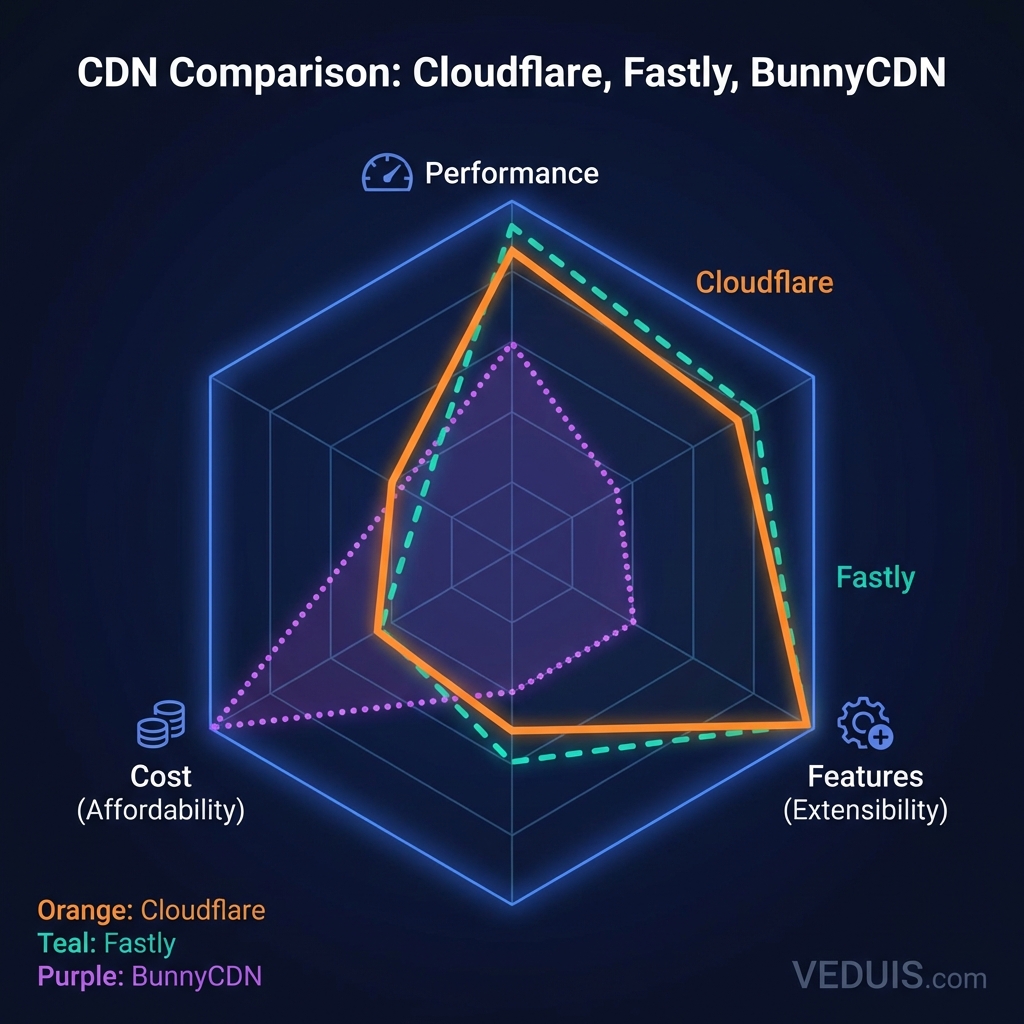
Here’s how I compare these providers across key dimensions.
Performance Comparison
| Metric | Cloudflare | Fastly | BunnyCDN |
|---|---|---|---|
| Network Size | 300+ cities | 90+ cities | 100+ cities |
| Avg TTFB | 45ms | 38ms | 52ms |
| Purge Speed | 30 seconds | 150ms | 5 seconds |
| HTTP/3 | Yes | Yes | Yes |
Fastly leads on purge speed, critical for sites with frequently changing content. Cloudflare’s massive network provides the best coverage. BunnyCDN offers competitive performance at lower cost.
Feature Comparison
| Feature | Cloudflare | Fastly | BunnyCDN |
|---|---|---|---|
| Edge Compute | Workers (JS/WASM) | Compute@Edge (WASM) | Edge Rules (basic) |
| WAF | Included (Pro+) | Add-on | Basic |
| Image Optimization | Yes | Yes | Yes |
| Video Streaming | Stream product | Native support | Bunny Stream |
| DDoS Protection | Included | Included | Basic |
| Free Tier | Yes | No | No |
Cloudflare and Fastly offer comparable feature depth. BunnyCDN provides essentials at lower cost but lacks advanced capabilities.
Cost Comparison (100TB/month bandwidth)
| Provider | Estimated Monthly Cost |
|---|---|
| Cloudflare Pro | $20 (unmetered) |
| Cloudflare Business | $200 (unmetered) |
| Fastly | $2,000–5,000 |
| BunnyCDN | $500–1,000 |
Cloudflare’s unmetered pricing dramatically favors high-bandwidth sites. Fastly commands premium pricing for premium features. BunnyCDN offers middle ground value.
Ease of Use Comparison
| Aspect | Cloudflare | Fastly | BunnyCDN |
|---|---|---|---|
| Setup Time | Minutes | Hours | Minutes |
| Learning Curve | Moderate | Steep | Low |
| Documentation | Extensive | Extensive | Good |
| Dashboard UX | Clean | Technical | Simple |
BunnyCDN and Cloudflare excel at quick setup. Fastly requires more technical investment but rewards it with control.
My Implementation Recommendations
For Small Business Websites
My Recommendation: Cloudflare Free or Pro
The free tier provides substantial value with no financial risk. Upgrading to Pro adds image optimization and WAF for modest cost. Unmetered bandwidth eliminates surprise bills.
For E-Commerce Sites
My Recommendation: Cloudflare Business or Fastly
E-commerce requires reliability and security. Cloudflare Business provides SLA guarantees and advanced security. I suggest Fastly for sites needing instant cache purge for inventory and pricing updates.
For Media and Publishing
My Recommendation: Fastly or BunnyCDN
Media companies benefit from Fastly’s streaming capabilities and real-time invalidation. I find budget-conscious publishers appreciate BunnyCDN’s pricing for high-bandwidth content.
For Development and Testing
My Recommendation: BunnyCDN
Low minimums and simple pricing suit development environments. The cost of experimentation remains negligible.
For Enterprise Applications
My Recommendation: Cloudflare Enterprise or Fastly
Enterprise needs justify premium pricing for dedicated support, custom configurations, and SLA guarantees. Choice depends on whether edge compute or comprehensive platform matters more.
Migration Considerations
When I help clients switch CDN providers, planning is essential:
- DNS changes - Point records to new CDN endpoints. Plan for propagation time.
- SSL certificates - Ensure certificates are configured on new provider before cutover.
- Cache warming - New CDN caches start empty. Traffic initially hits origin servers harder.
- Configuration parity - Recreate cache rules, security settings, and optimizations on new platform.
- Testing - Verify functionality with a portion of traffic before full migration.
- Rollback plan - Maintain ability to revert if issues emerge.
In my experience, CDN selection significantly impacts web application performance, security, and operating costs. Each provider serves different needs effectively. I’ve found that matching provider strengths to specific requirements leads to better outcomes than chasing benchmark numbers or feature lists alone.