Off-the-shelf large language models perform impressively on general tasks, but I’ve found that businesses often need AI that understands their specific domain, terminology, and use cases. Fine-tuning transforms a general-purpose model into a specialized tool that knows the difference between industry jargon, follows company-specific formatting requirements, and produces outputs aligned with organizational standards.
The emergence of powerful open-source models like Mistral and Llama 3, combined with efficient training techniques like LoRA, makes custom AI accessible to businesses without massive compute budgets. In my experience, a model fine-tuned on company data can outperform much larger general models on domain-specific tasks while running on affordable hardware.
Understanding Fine-Tuning Fundamentals
Fine-tuning adapts a pre-trained model to perform better on specific tasks or domains. Rather than training from scratch, which requires billions of examples and enormous compute resources, fine-tuning starts with a model that already understands language and teaches it new patterns through focused additional training.
Pre-training vs Fine-Tuning
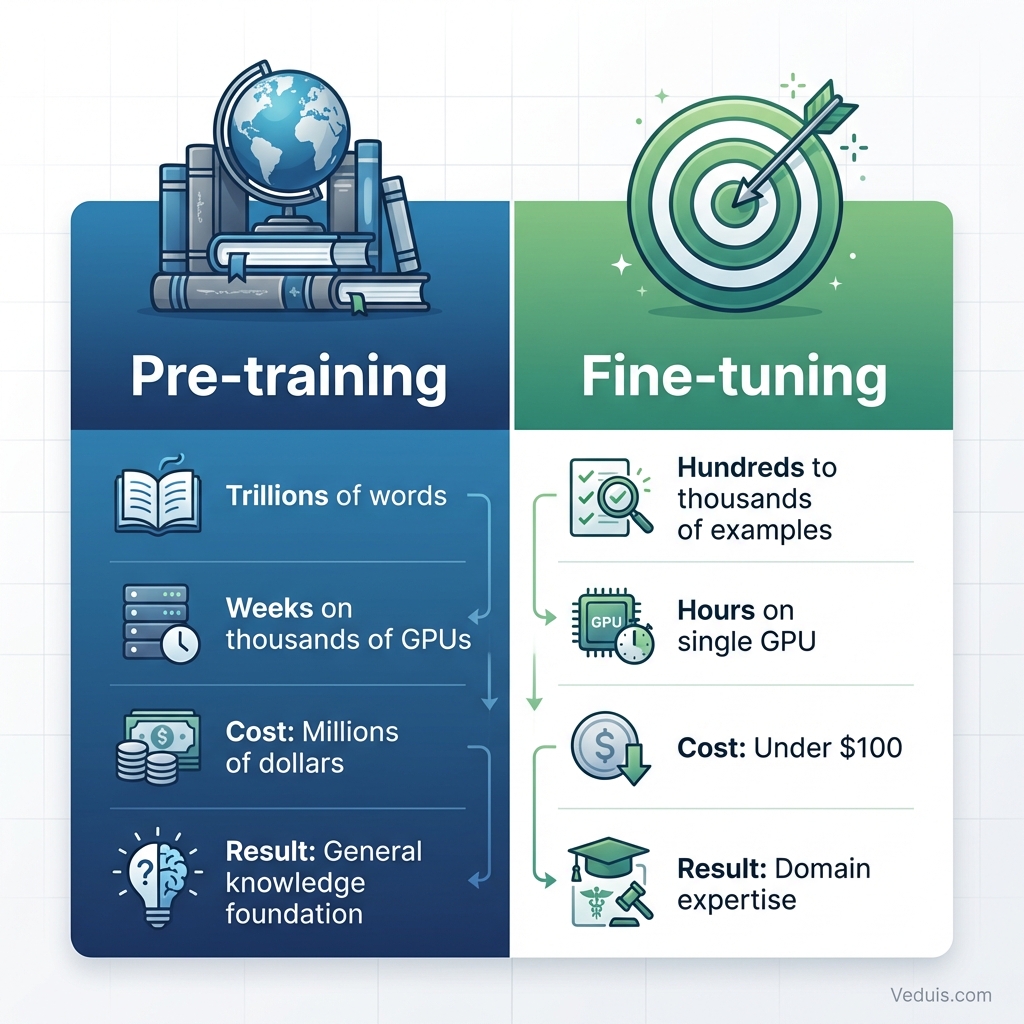
Pre-training creates the foundation. Models learn grammar, facts, reasoning patterns, and general knowledge by processing trillions of words from books, websites, and other text sources. This phase requires weeks of training on thousands of GPUs and costs millions of dollars.
Fine-tuning builds on that foundation. Starting with all the knowledge from pre-training, fine-tuning teaches the model new skills or domain expertise through much smaller, focused datasets. This phase might take hours on a single GPU and cost under $100.
The analogy works like education: Pre-training is elementary through high school, providing broad foundational knowledge. Fine-tuning is specialized professional training that builds domain expertise on top of that foundation.
Types of Fine-Tuning
Different fine-tuning approaches suit different objectives:
Full fine-tuning updates all model parameters. This provides maximum flexibility but requires substantial compute resources and risks catastrophic forgetting, where the model loses capabilities it had before fine-tuning.
Parameter-efficient fine-tuning (PEFT) updates only a small subset of parameters or adds small trainable modules to the frozen base model. This dramatically reduces compute requirements while often matching full fine-tuning performance.
Instruction fine-tuning teaches models to follow specific instruction formats and response patterns. This works well for customer service, content generation, and other structured output tasks.
Domain adaptation exposes models to domain-specific text to improve understanding of specialized vocabulary and concepts without necessarily changing output behavior.
Choosing the Right Base Model
I’ve learned that the foundation matters enormously. Starting with a capable base model and fine-tuning it effectively produces better results than starting with a weaker model.
Mistral Models
Mistral AI produces some of the most capable open-source models available. Mistral 7B punches well above its weight class, often matching models with twice as many parameters on benchmarks.
Mistral strengths:
- Excellent performance-to-size ratio
- Strong reasoning and instruction-following
- Permissive licensing for commercial use
- Active community and tooling support
Mistral works particularly well for businesses needing capable models that run on modest hardware. The 7B version fine-tunes comfortably on consumer GPUs with 24GB VRAM.
Llama 3 Models
Meta’s Llama 3 represents the current generation of open-source foundation models. Available in 8B and 70B parameter versions, Llama 3 offers strong performance across diverse tasks.
Llama 3 advantages:
- State-of-the-art open-source performance
- Extended context window capabilities
- Strong multilingual support
- Extensive fine-tuning documentation and community examples
The 8B version suits most business fine-tuning projects, offering an excellent balance of capability and trainability. The 70B version provides flagship performance but requires multi-GPU setups for fine-tuning.
Model Selection Criteria
I consider these factors when choosing a base model:
- Task complexity - More complex tasks benefit from larger models
- Inference costs - Smaller models reduce ongoing serving expenses
- Hardware availability - Training hardware constrains maximum model size
- Licensing requirements - Some models restrict commercial deployment
- Language needs - Multilingual requirements favor models with broader training data
For most business applications, starting with Mistral 7B or Llama 3 8B provides excellent results while remaining trainable on accessible hardware.
Preparing Training Data
I’ve learned that data quality determines fine-tuning success more than any other factor. A small dataset of high-quality examples outperforms larger datasets filled with noise or errors.
Dataset Structure
Fine-tuning datasets consist of input-output pairs showing the model desired behavior. The specific format depends on the task:
Instruction format:
{
  "instruction": "Summarize the following customer complaint for our support ticket system",
  "input": "I ordered product #12345 three weeks ago and it still hasn't arrived. I've tried calling support twice but nobody answers. This is ridiculous service and I want a refund immediately.",
  "output": "Issue: Delayed shipment (3+ weeks) for order #12345. Customer attempted support contact twice unsuccessfully. Resolution requested: Full refund. Priority: High - customer retention risk."
}
Conversation format:
{
  "conversations": [
    {"role": "user", "content": "What's the return policy for electronics?"},
    {"role": "assistant", "content": "Electronics can be returned within 30 days of purchase with original packaging. Items must be in resellable condition. Opened software is non-returnable. Would you like me to start a return for a specific item?"}
  ]
}
Data Collection Strategies
I find that building effective training datasets requires intentional collection:
From existing operations:
- Customer service transcripts with successful resolutions
- Internal documentation and process guides
- Expert-written examples of desired outputs
- Historical reports and analyses
Synthetic data generation:
- Use larger models to generate examples from prompts
- Create variations of existing examples
- Generate edge cases and unusual scenarios
Crowdsourcing:
- Commission domain experts to create examples
- Have employees contribute examples from daily work
- Use annotation platforms for larger scale collection
Data Quality Guidelines
I apply rigorous quality standards to training data:
Accuracy - Every example must be factually correct. Errors in training data become errors in the model.
Consistency - Similar inputs should produce similar output styles and formats.
Diversity - Include varied examples covering the range of expected inputs.
Balance - Avoid over-representing any single pattern or response type.
Length appropriateness - Outputs should match the desired length for production use.
Remove personally identifiable information - Scrub names, emails, and other sensitive data before training.
Dataset Size Recommendations
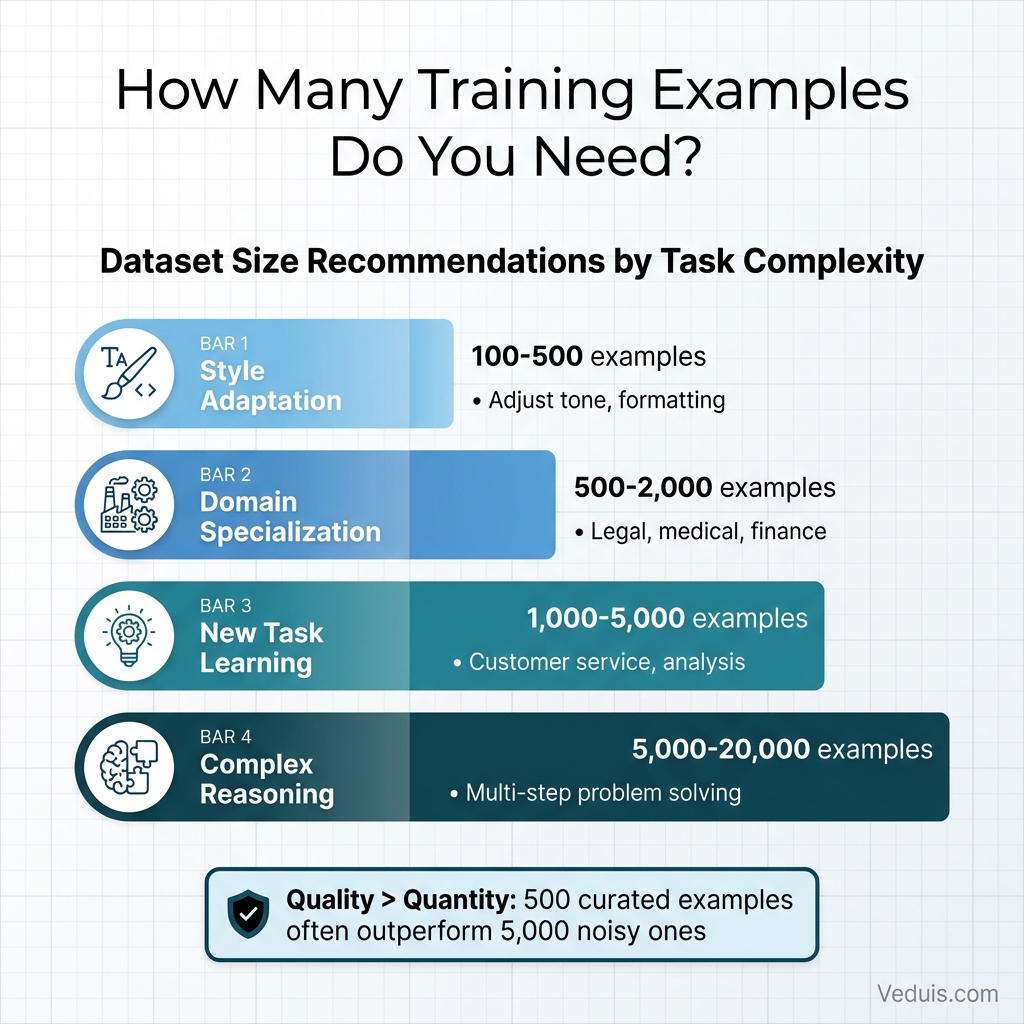
Minimum viable datasets depend on task complexity:
- Style adaptation - 100-500 examples
- Domain specialization - 500-2,000 examples
- New task learning - 1,000-5,000 examples
- Complex reasoning tasks - 5,000-20,000 examples
More data generally helps, but quality matters more than quantity. In my experience, a carefully curated 500-example dataset often outperforms a noisy 5,000-example dataset.
LoRA: Efficient Fine-Tuning for Business
Low-Rank Adaptation (LoRA) has become the dominant fine-tuning technique I use for business applications. It achieves results comparable to full fine-tuning while reducing compute requirements by 90% or more.
How LoRA Works
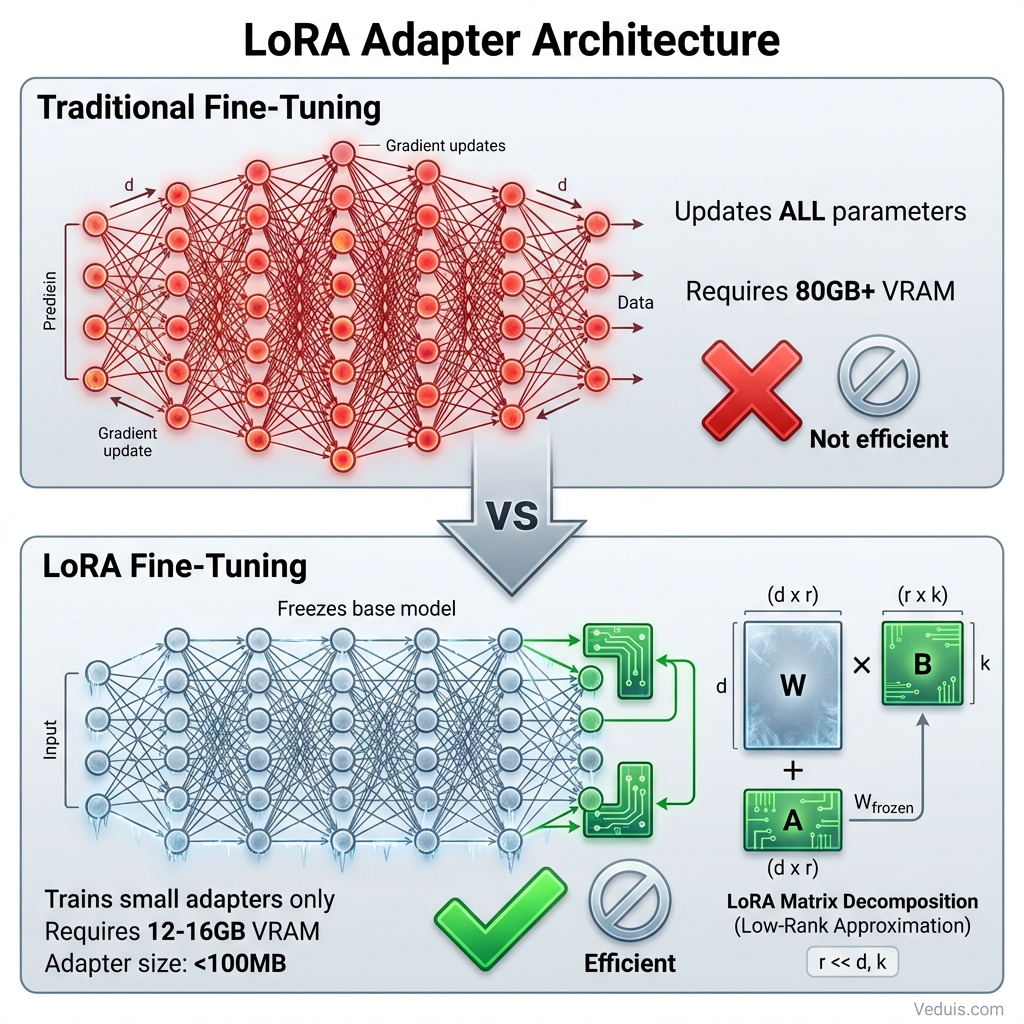
Instead of updating billions of model parameters during training, LoRA freezes the original weights and injects small trainable matrices at key points in the model architecture. These matrices capture the adaptations needed for the target task.
Technical explanation simplified:
The original model weights form a matrix of size (d x k). Rather than training all d*k parameters, LoRA adds two small matrices of size (d x r) and (r x k), where r is much smaller than both d and k. Training only these small matrices requires far less memory and compute while still adapting the model effectively.
Typical rank values (r) range from 8 to 64. Higher ranks provide more adaptation capacity but increase training costs. Rank 16 works well for most business applications.
LoRA Advantages
Memory efficiency - Training a 7B model with LoRA requires 12-16GB VRAM instead of 80GB+ for full fine-tuning.
Speed - Training completes in hours rather than days.
Modularity - Multiple LoRA adapters can coexist, enabling different specializations from the same base model.
Preservation - The base model’s general capabilities remain intact since original weights stay frozen.
Portability - LoRA adapters are small files (often under 100MB) that can be shared and version-controlled easily.
Setting Up a LoRA Training Environment
My practical training setup requires:
Hardware:
- GPU with 16-24GB VRAM (RTX 3090, 4090, or A10)
- 32GB+ system RAM
- Fast SSD storage for datasets and checkpoints
Software:
- Python 3.10+
- PyTorch 2.0+
- Transformers library from Hugging Face
- PEFT library for LoRA implementation
- bitsandbytes for quantization support
# Environment setup
pip install torch transformers peft datasets accelerate bitsandbytes
Step-by-Step Fine-Tuning Process
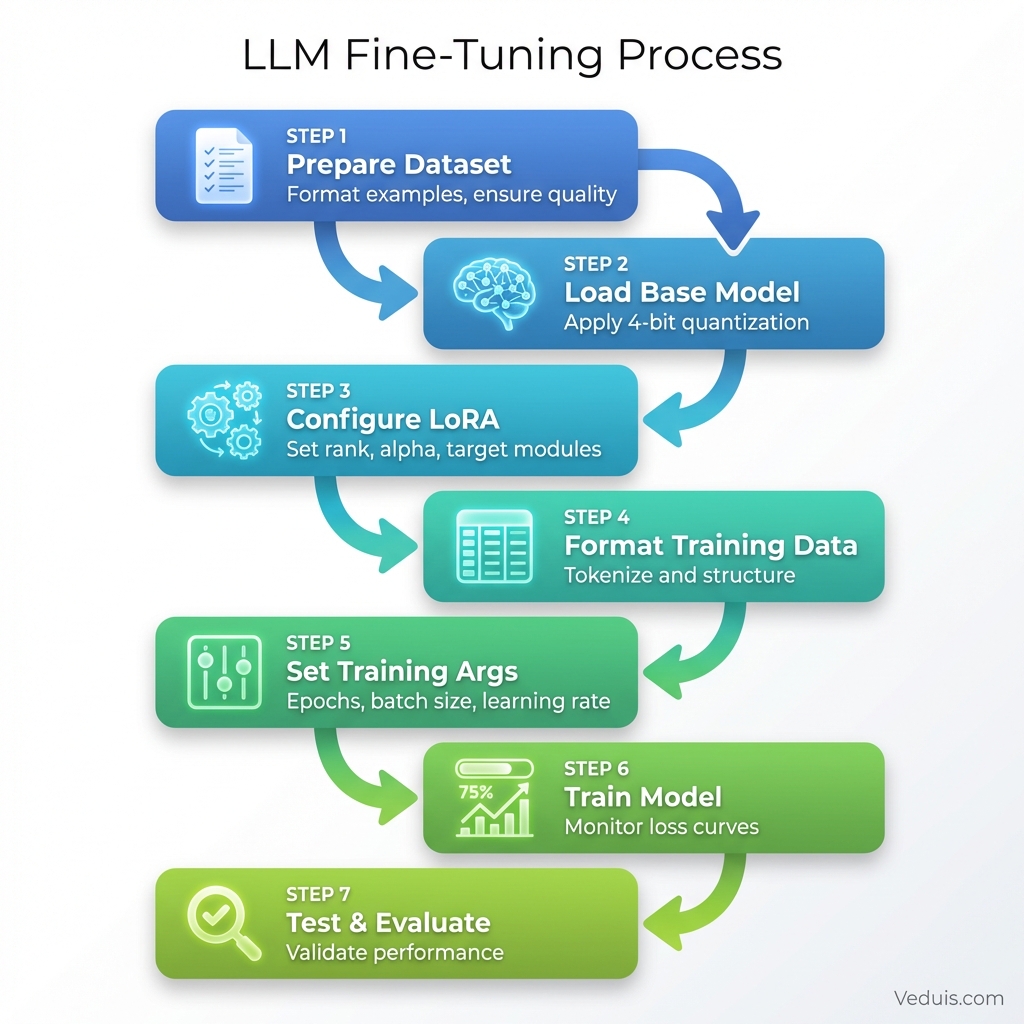
This walkthrough covers how I fine-tune Mistral 7B with LoRA for a customer service application.
Step 1: Prepare the Dataset
Format training examples consistently and save as JSONL:
import json

# Example training data
training_examples = [
    {
        "instruction": "Respond to this customer inquiry professionally",
        "input": "When will my order ship?",
        "output": "Thank you for reaching out! Orders typically ship within 1-2 business days. Once shipped, you'll receive a confirmation email with tracking information. May I have your order number to check the specific status?"
    },
    # Add hundreds more examples...
]

with open("customer_service_data.jsonl", "w") as f:
    for example in training_examples:
        f.write(json.dumps(example) + "\n")
Step 2: Load Base Model with Quantization
4-bit quantization enables training larger models on consumer hardware:
from transformers import AutoModelForCausalLM, AutoTokenizer, BitsAndBytesConfig
import torch

model_name = "mistralai/Mistral-7B-v0.1"

# Configure 4-bit quantization
bnb_config = BitsAndBytesConfig(
    load_in_4bit=True,
    bnb_4bit_use_double_quant=True,
    bnb_4bit_quant_type="nf4",
    bnb_4bit_compute_dtype=torch.bfloat16
)

# Load model and tokenizer
model = AutoModelForCausalLM.from_pretrained(
    model_name,
    quantization_config=bnb_config,
    device_map="auto"
)

tokenizer = AutoTokenizer.from_pretrained(model_name)
tokenizer.pad_token = tokenizer.eos_token
Step 3: Configure LoRA Parameters
Set up the LoRA configuration for training:
from peft import LoraConfig, get_peft_model, prepare_model_for_kbit_training

# Prepare model for training
model = prepare_model_for_kbit_training(model)

# LoRA configuration
lora_config = LoraConfig(
    r=16,                          # Rank
    lora_alpha=32,                 # Scaling factor
    target_modules=[               # Which layers to adapt
        "q_proj",
        "k_proj",
        "v_proj",
        "o_proj",
    ],
    lora_dropout=0.05,
    bias="none",
    task_type="CAUSAL_LM"
)

# Apply LoRA to model
model = get_peft_model(model, lora_config)

# Print trainable parameters
model.print_trainable_parameters()
# Output: trainable params: 13,631,488 || all params: 3,752,071,168 || trainable%: 0.36
Step 4: Prepare Dataset for Training
Format data for the training loop:
from datasets import load_dataset

def format_instruction(example):
    """Format examples into instruction-following format"""
    prompt = f"""### Instruction:
{example['instruction']}

### Input:
{example['input']}

### Response:
{example['output']}"""
    return {"text": prompt}

# Load and format dataset
dataset = load_dataset("json", data_files="customer_service_data.jsonl")
dataset = dataset.map(format_instruction)

# Tokenize
def tokenize(example):
    result = tokenizer(
        example["text"],
        truncation=True,
        max_length=512,
        padding="max_length"
    )
    result["labels"] = result["input_ids"].copy()
    return result

tokenized_dataset = dataset.map(tokenize, remove_columns=dataset["train"].column_names)
Step 5: Configure Training Arguments
Set training hyperparameters:
from transformers import TrainingArguments

training_args = TrainingArguments(
    output_dir="./customer_service_model",
    num_train_epochs=3,
    per_device_train_batch_size=4,
    gradient_accumulation_steps=4,
    learning_rate=2e-4,
    warmup_steps=100,
    logging_steps=25,
    save_strategy="epoch",
    fp16=True,
    optim="paged_adamw_8bit",
    report_to="none"
)
Step 6: Train the Model
Execute the training loop:
from transformers import Trainer, DataCollatorForLanguageModeling

# Data collator for language modeling
data_collator = DataCollatorForLanguageModeling(
    tokenizer=tokenizer,
    mlm=False
)

# Initialize trainer
trainer = Trainer(
    model=model,
    args=training_args,
    train_dataset=tokenized_dataset["train"],
    data_collator=data_collator
)

# Start training
trainer.train()

# Save the fine-tuned adapter
model.save_pretrained("./customer_service_adapter")
Step 7: Test the Fine-Tuned Model
Evaluate the model on new examples:
# Merge adapter with base model for inference
from peft import PeftModel

# Load base model
base_model = AutoModelForCausalLM.from_pretrained(
    model_name,
    torch_dtype=torch.float16,
    device_map="auto"
)

# Load and merge adapter
model = PeftModel.from_pretrained(base_model, "./customer_service_adapter")
model = model.merge_and_unload()

# Test inference
prompt = """### Instruction:
Respond to this customer inquiry professionally

### Input:
I received the wrong item in my order

### Response:
"""

inputs = tokenizer(prompt, return_tensors="pt").to(model.device)
outputs = model.generate(**inputs, max_new_tokens=150)
print(tokenizer.decode(outputs[0], skip_special_tokens=True))
Evaluating Fine-Tuned Models
I use rigorous evaluation to ensure the fine-tuned model performs as expected before deployment.
Quantitative Metrics
Track numerical performance indicators:
- Loss curves - Training and validation loss should decrease steadily
- Perplexity - Lower values indicate better language modeling
- Task-specific metrics - Accuracy, F1, BLEU depending on application
Qualitative Assessment
I find that human evaluation catches issues metrics miss:
- Review 50-100 model outputs across diverse inputs
- Check for hallucinations or factual errors
- Verify appropriate tone and formatting
- Test edge cases and unusual queries
- Compare against base model on same inputs
A/B Testing Approach
Before full deployment, compare fine-tuned model against alternatives:
- Route traffic randomly between models
- Measure user satisfaction, resolution rates, escalation frequency
- Collect feedback on response quality
- Make deployment decisions based on production metrics
Deployment Strategies
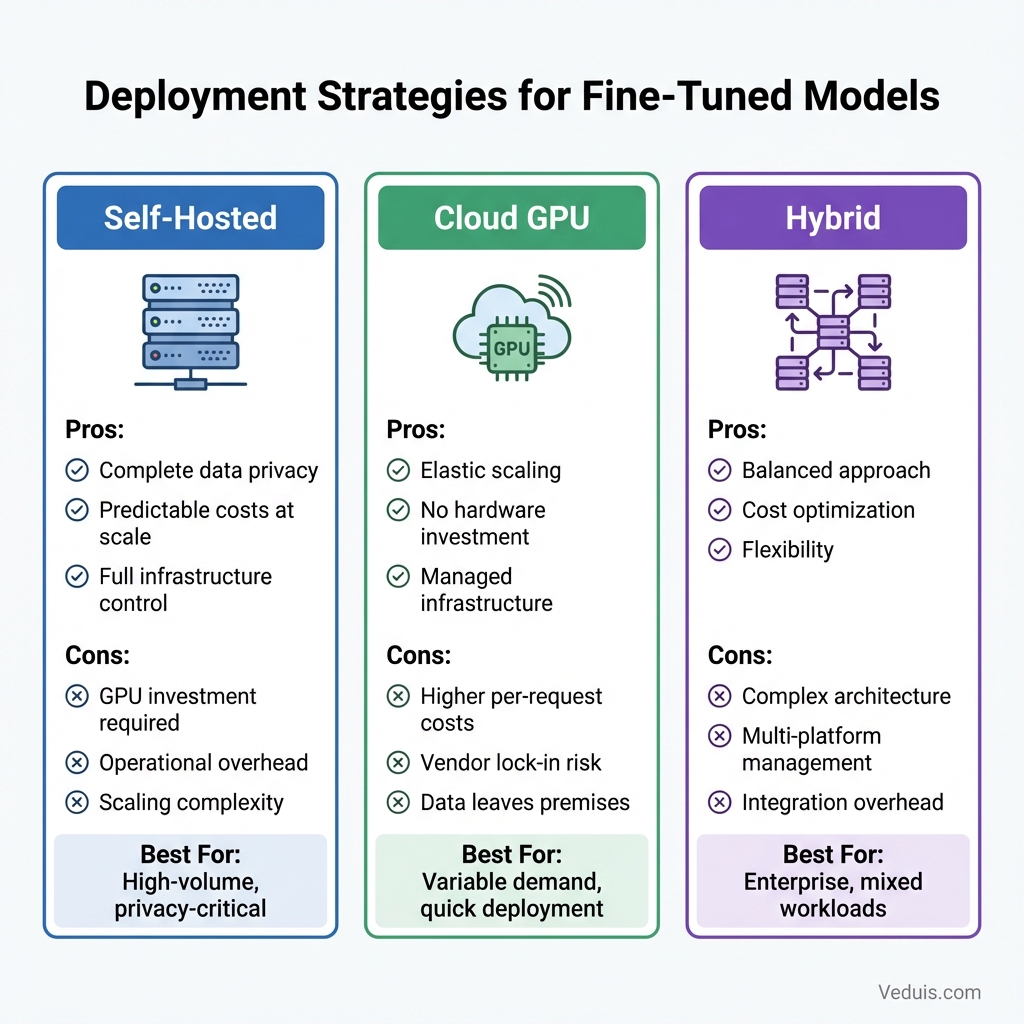
Getting fine-tuned models into production requires attention to infrastructure, cost, and reliability. Here are the approaches I use.
Self-Hosted Deployment
Running models on owned infrastructure provides maximum control:
Advantages:
- Complete data privacy
- Predictable costs at scale
- Customizable infrastructure
Considerations:
- Requires GPU infrastructure investment
- Operational overhead for maintenance
- Scaling complexity for variable demand
Tools like vLLM or Text Generation Inference provide optimized serving for self-hosted deployments.
Cloud GPU Services
Major cloud providers offer GPU instances for model serving:
- AWS with G5 instances and SageMaker
- Google Cloud with A100/H100 instances and Vertex AI
- Azure with NC-series VMs and Azure ML
Cloud deployment trades higher per-request costs for operational simplicity and elastic scaling.
Inference Optimization
I reduce serving costs through optimization techniques:
Quantization - Run inference at 4-bit or 8-bit precision for 2-4x memory reduction.
Batching - Process multiple requests together for throughput improvement.
Caching - Store common responses to avoid redundant generation.
Model distillation - Train smaller models to mimic fine-tuned model behavior.
Common Pitfalls and Solutions
Here are frequent fine-tuning mistakes I’ve learned to avoid:
Overfitting to training data - The model memorizes examples rather than learning patterns. Solution: Use validation split, apply regularization, and ensure dataset diversity.
Catastrophic forgetting - Fine-tuning destroys useful base model capabilities. Solution: Use LoRA or mix general examples into training data.
Format inconsistency - Training examples use inconsistent structures. Solution: Standardize all examples before training and use templates.
Insufficient examples - The dataset lacks coverage for important cases. Solution: Identify gaps through evaluation and add targeted examples.
Wrong base model - Starting model lacks necessary capabilities. Solution: Test base model on target tasks before fine-tuning.
Maintenance and Iteration
I’ve found that fine-tuned models require ongoing attention:
Monitor production performance - Track quality metrics continuously and alert on degradation.
Collect feedback - Capture user ratings and corrections to identify improvement opportunities.
Regular retraining - Update models periodically with new examples and corrected outputs.
Version management - Maintain adapter versions and enable rollback when issues arise.
Documentation - Record training data sources, configurations, and evaluation results for each version.
In my experience, fine-tuning open-source LLMs democratizes custom AI capabilities that previously required enterprise budgets. With careful data preparation, appropriate base model selection, and rigorous evaluation, I’ve helped businesses of any size build AI tools tailored to their specific needs.