Every business I’ve worked with hits the same wall. They get ChatGPT or Claude working on general tasks, then someone asks it about the company’s refund policy, their specific product specs, or a contract clause from six months ago, and the model either makes something up or admits it doesn’t know. The model has never seen your data. That’s not a bug; that’s how language models work.
Fine-tuning sounds like the answer. Train the model on your internal documents and it will know your stuff. In practice, fine-tuning is expensive, slow to update, and doesn’t actually give the model reliable recall of specific facts. It shifts the model’s general behavior. It doesn’t give it a searchable memory.
If you’re weighing fine-tuning against other approaches, our guide on fine-tuning open-source LLMs for business breaks down when training your own model makes sense and when it does not.
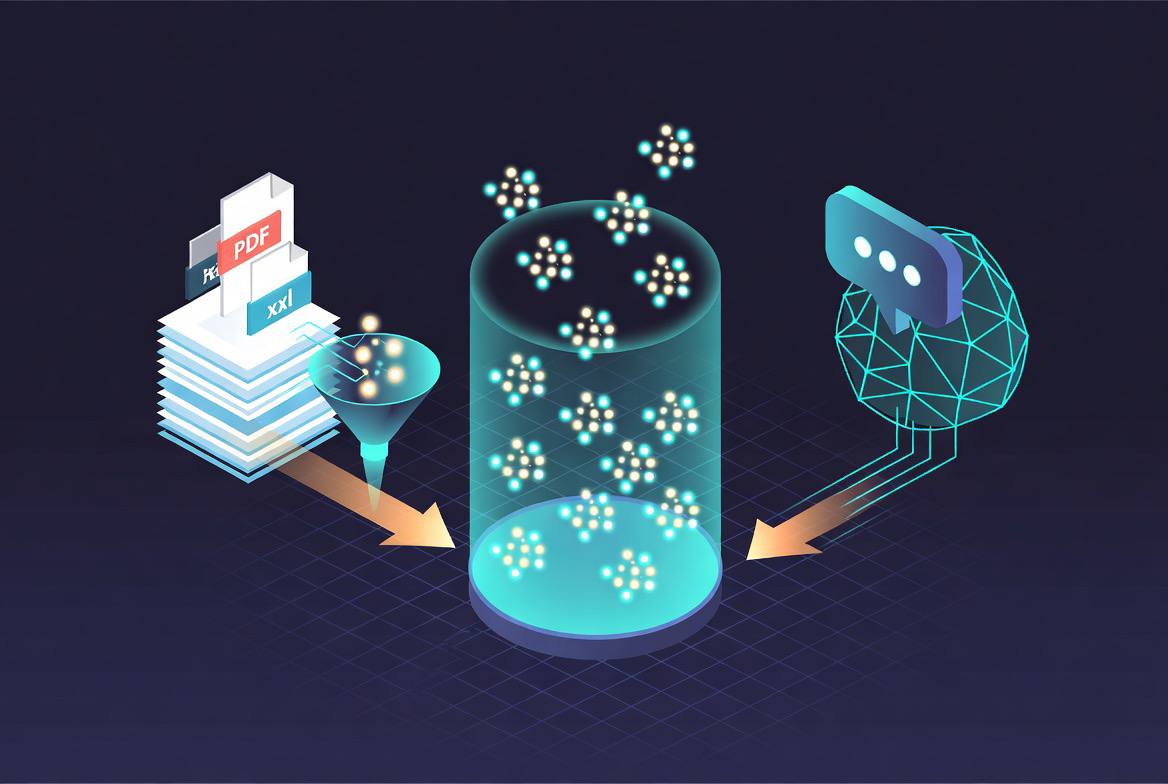
Retrieval-Augmented Generation (RAG) is the architecture that actually solves this. Instead of baking knowledge into model weights, you build a searchable index of your documents and retrieve the relevant ones at query time, then pass them to the model as context. The model reasons over real source material rather than guessing from memory. Updates to your knowledge base take effect immediately, no retraining required.
I’ve built RAG systems for internal documentation search, customer support knowledge bases, contract analysis tools, and compliance Q&A systems. The core architecture is the same every time. This guide covers it completely.
How RAG Works
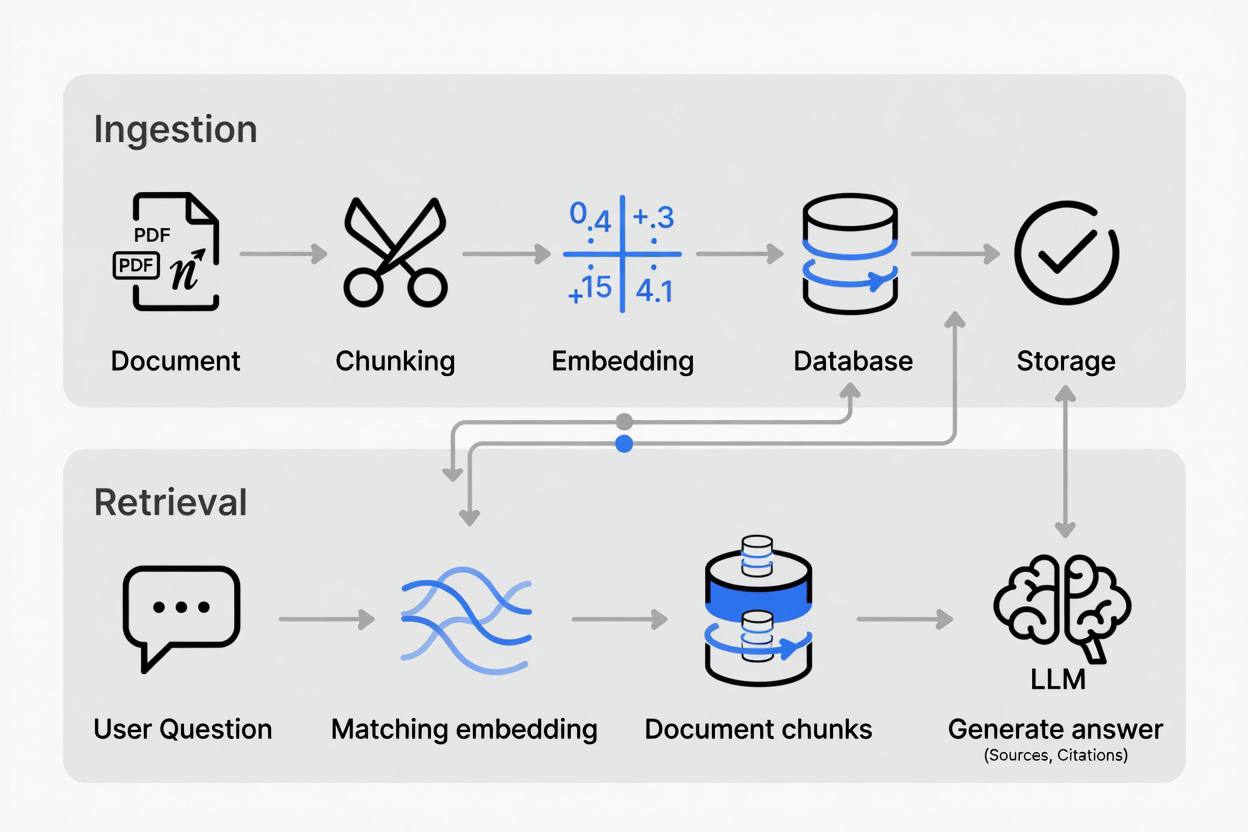
The RAG pipeline has two phases: ingestion (indexing your documents) and retrieval (finding relevant content at query time).
Ingestion phase:
- Load documents from your source (PDFs, databases, wikis, URLs)
- Split documents into chunks of manageable size
- Convert each chunk to a vector embedding (a numerical representation of meaning)
- Store embeddings in a vector database alongside the original text
Retrieval phase:
- User submits a question
- Convert the question to an embedding using the same model
- Search the vector database for chunks with the most similar embeddings
- Pass the retrieved chunks as context to the LLM
- LLM generates an answer grounded in the retrieved material
The magic is in step 3: semantic similarity search. A vector database doesn’t match keywords; it finds chunks that are conceptually similar to the question, even when the wording differs completely. If you’re new to vector search, our vector search fundamentals guide explains how embeddings and similarity scoring work under the hood.
Choosing a Vector Database
The vector database is the foundation of the system. Your choice affects query latency, operational complexity, and cost.
Pinecone
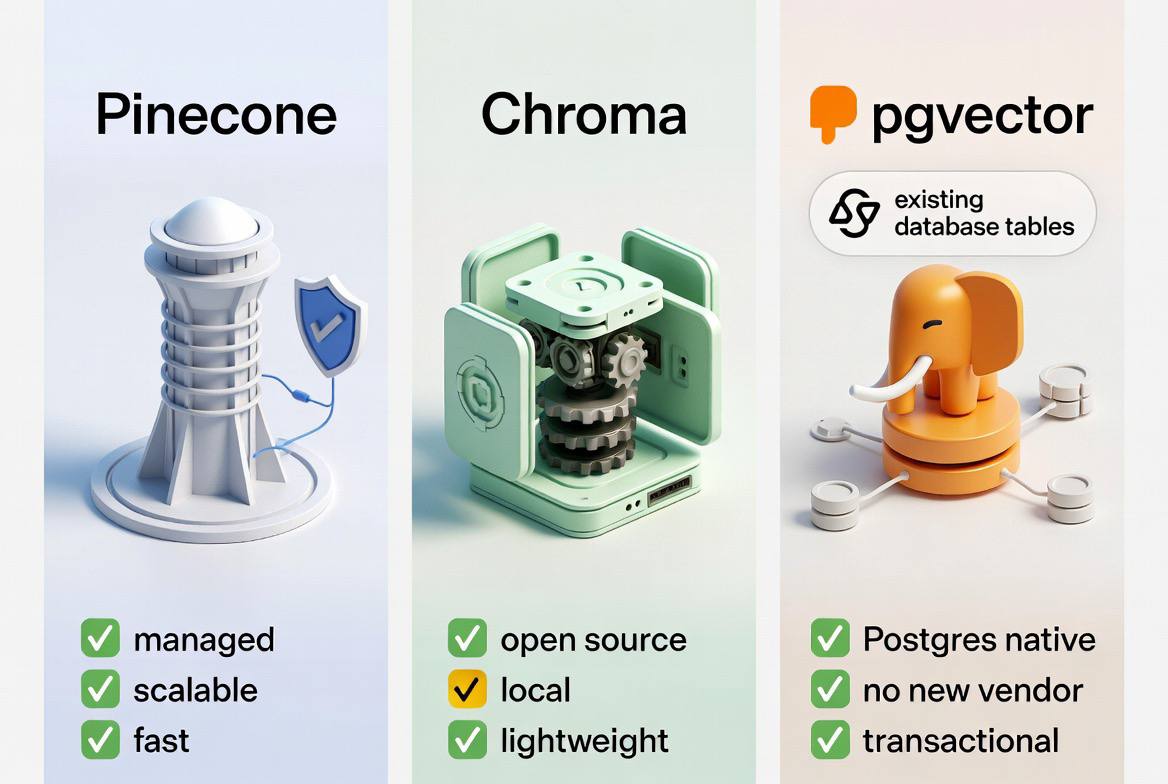
Pinecone is a fully managed vector database built for production scale. There’s no infrastructure to manage; you create an index, insert vectors, and query it via API.
Where Pinecone excels:
- Production deployments with variable traffic
- Teams who want zero infrastructure management
- Applications needing 99.99% availability SLAs
Where it falls short:
- Paid service (free tier is limited to one index with 100K vectors)
- Data leaves your infrastructure (relevant for sensitive industries)
- Less control over underlying storage and indexing behavior
For most growing businesses, Pinecone’s managed nature is worth the cost. The free tier is enough to prototype and demo, and the starter plan covers most small-to-medium knowledge bases. If you are already running PostgreSQL, pgvector (covered below) lets you add vectors without adding another vendor to your stack.
Chroma
Chroma is an open-source vector database that runs embedded in your application process or as a separate server. It requires zero external services for local development and small deployments.
Where Chroma excels:
- Local development and prototyping
- Deployments where data must stay on-premises
- Smaller knowledge bases (under a few million vectors)
- Python-native workflows
Where it falls short:
- Horizontal scaling requires custom work
- Production deployments over significant scale need attention to resource sizing
Chroma is my default for new projects during development. I switch to Pinecone or pgvector when I have clear production requirements.
pgvector
pgvector is a PostgreSQL extension that adds vector storage and similarity search to a database you likely already operate. If your application data lives in Postgres, storing embeddings there too eliminates a separate infrastructure component entirely.
Where pgvector excels:
- Teams already running PostgreSQL in production
- Applications needing transactional consistency between application data and embeddings
- Deployments where adding another managed service isn’t feasible
- Cost-conscious setups where you’re already paying for a Postgres instance
Where it falls short:
- Approximate nearest-neighbor (ANN) search at very large scale is slower than purpose-built vector databases
- Requires PostgreSQL operational knowledge
The performance limitation matters at scale. For knowledge bases under a few million vectors, which covers the vast majority of business applications, pgvector performs adequately. I run it in production for several clients who are already on managed PostgreSQL services. If your application is hitting Postgres limits, our guide to database sharding for SaaS applications covers horizontal scaling strategies that apply to pgvector workloads as well.
Quick decision framework
- Prototype or small-scale production with Postgres already in use → pgvector
- On-premises requirement or open-source preference → Chroma (self-hosted)
- Production scale with managed infrastructure preference → Pinecone
- Very large scale with complex filtering requirements → Weaviate or Qdrant
Embedding Models
Embeddings convert text to vectors. The model you choose determines how well semantic similarity search performs, and how much each query costs.
OpenAI text-embedding-3-small
OpenAI’s embedding models are the most widely used in production RAG systems. text-embedding-3-small produces 1536-dimensional vectors and costs $0.02 per million tokens. For most knowledge bases, this is a rounding error.
text-embedding-3-large produces higher-quality embeddings for complex semantic matching but costs 13x more. I use text-embedding-3-small unless I’m working with dense technical or legal content where nuanced similarity matters.
Open-source alternatives
If data privacy requires keeping text on-premises, several open-source models perform comparably:
- BAAI/bge-large-en-v1.5: Consistently top-ranked on the MTEB leaderboard, free to run locally
- nomic-ai/nomic-embed-text-v1.5: Strong performance with support for variable context lengths
- sentence-transformers/all-MiniLM-L6-v2: Small, fast, good for prototyping
For on-premises deployments, I run these via Ollama or sentence-transformers and see latencies under 50ms for single-document embedding on CPU. If your business is deciding between cloud and local AI infrastructure, our comparison of local LLMs versus cloud AI for small business walks through the cost, privacy, and performance trade-offs.
Critical rule: Use the same embedding model for ingestion and retrieval. Vectors from different models are not comparable; mixing them produces nonsense search results.
Chunking Strategies
How you split documents into chunks has a bigger impact on retrieval quality than almost any other architectural decision. Chunks that are too large overwhelm the LLM’s context window and dilute relevance. Chunks that are too small lose the surrounding context the model needs to answer correctly.
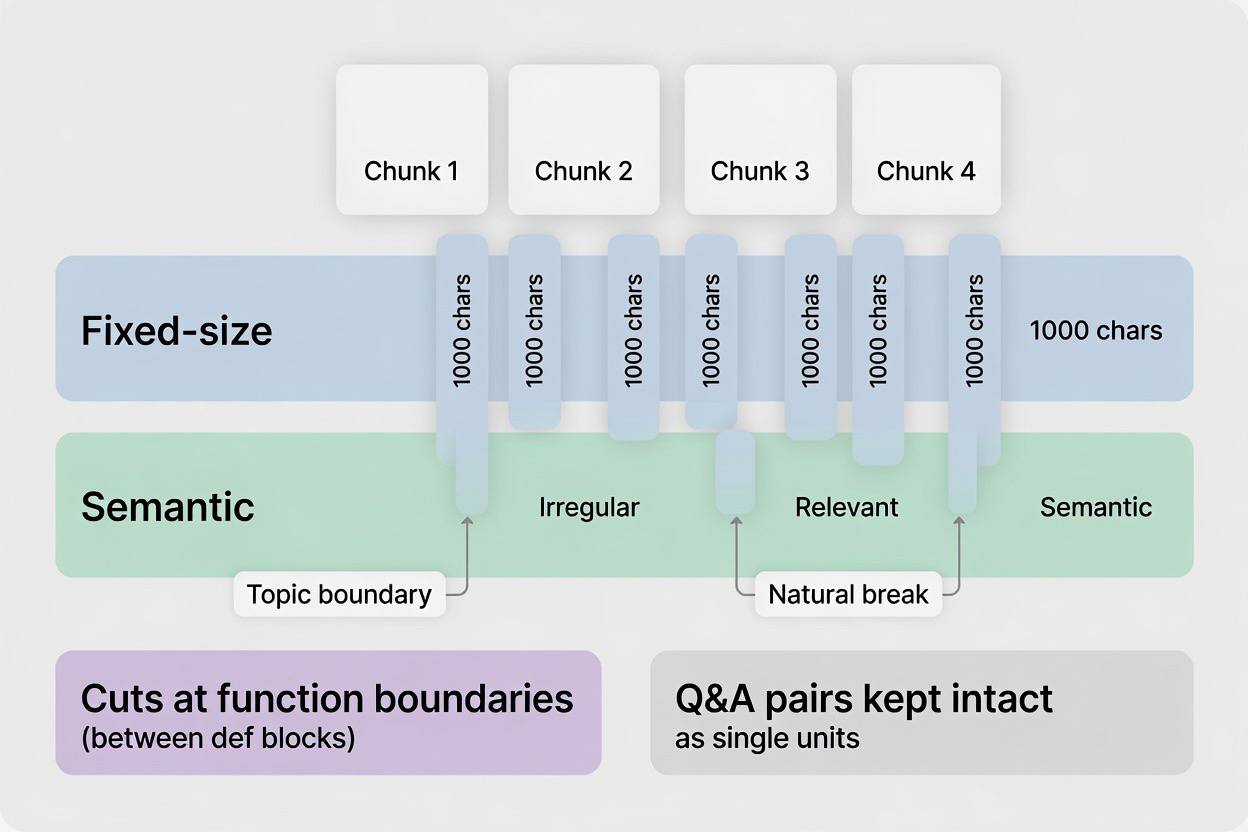
Fixed-size chunking
Split documents every N characters or tokens, with overlap between adjacent chunks to preserve context across boundaries.
from langchain.text_splitter import RecursiveCharacterTextSplitter

splitter = RecursiveCharacterTextSplitter(
    chunk_size=1000,       # characters per chunk
    chunk_overlap=200,     # overlap between consecutive chunks
    separators=["\n\n", "\n", ". ", " ", ""]
)

chunks = splitter.split_text(document_text)
RecursiveCharacterTextSplitter from LangChain tries to split on paragraph breaks first, then line breaks, then sentence boundaries, preserving natural language units wherever possible. I use 1000 characters with 200 overlap as my starting point and adjust based on the source material.
Semantic chunking
Semantic chunking groups sentences that discuss the same topic, regardless of where paragraph breaks fall. It’s more expensive to compute but produces more coherent chunks for documents with irregular structure.
from langchain_experimental.text_splitter import SemanticChunker
from langchain_openai import OpenAIEmbeddings

semantic_splitter = SemanticChunker(
    OpenAIEmbeddings(),
    breakpoint_threshold_type="percentile",
    breakpoint_threshold_amount=95
)

chunks = semantic_splitter.split_text(document_text)
I use semantic chunking for user manuals, legal documents, and support articles where section boundaries matter significantly for answer quality.
Document-specific strategies
Different document types benefit from different approaches:
- Markdown and HTML: Split on heading levels (H1, H2, H3) first, then by size
- PDFs with tables: Extract tables separately from prose; tables often answer precise factual queries
- Code files: Split on function or class boundaries, never mid-function
- Q&A content: Keep question-answer pairs together as single chunks
The metadata you store alongside each chunk matters as much as the text itself. Always include the source document name, page number if applicable, section heading, and creation date. This lets you filter results by recency or document type, and lets the model cite sources accurately.
End-to-End Implementation
Here’s a complete RAG pipeline using Chroma for local development, with easy migration to Pinecone for production.
Setup and dependencies
pip install langchain langchain-openai langchain-chroma chromadb pypdf python-dotenvDocument ingestion pipeline
import os
from pathlib import Path
from dotenv import load_dotenv
from langchain_community.document_loaders import PyPDFLoader, TextLoader, DirectoryLoader
from langchain.text_splitter import RecursiveCharacterTextSplitter
from langchain_openai import OpenAIEmbeddings
from langchain_chroma import Chroma

load_dotenv()

CHROMA_PATH = "./chroma_db"
DOCS_PATH = "./documents"

def load_documents(directory: str) -> list:
    """Load all PDFs and text files from a directory."""
    loaders = [
        DirectoryLoader(directory, glob="**/*.pdf", loader_cls=PyPDFLoader),
        DirectoryLoader(directory, glob="**/*.txt", loader_cls=TextLoader),
        DirectoryLoader(directory, glob="**/*.md", loader_cls=TextLoader),
    ]
    documents = []
    for loader in loaders:
        try:
            documents.extend(loader.load())
        except Exception as e:
            print(f"Warning loading documents: {e}")
    return documents

def chunk_documents(documents: list) -> list:
    """Split documents into chunks with overlap."""
    splitter = RecursiveCharacterTextSplitter(
        chunk_size=1000,
        chunk_overlap=200,
        add_start_index=True,  # records position in source doc
    )
    chunks = splitter.split_documents(documents)
    print(f"Split {len(documents)} documents into {len(chunks)} chunks")
    return chunks

def build_vector_store(chunks: list) -> Chroma:
    """Embed chunks and store in Chroma."""
    embeddings = OpenAIEmbeddings(model="text-embedding-3-small")

    # Remove existing database if rebuilding
    if Path(CHROMA_PATH).exists():
        import shutil
        shutil.rmtree(CHROMA_PATH)

    vector_store = Chroma.from_documents(
        documents=chunks,
        embedding=embeddings,
        persist_directory=CHROMA_PATH
    )
    print(f"Stored {len(chunks)} chunks in vector database")
    return vector_store

if __name__ == "__main__":
    docs = load_documents(DOCS_PATH)
    chunks = chunk_documents(docs)
    build_vector_store(chunks)
    print("Ingestion complete.")
Query and answer pipeline
from langchain_openai import ChatOpenAI, OpenAIEmbeddings
from langchain_chroma import Chroma
from langchain.prompts import ChatPromptTemplate
from langchain.schema.runnable import RunnablePassthrough
from langchain.schema.output_parser import StrOutputParser

CHROMA_PATH = "./chroma_db"

PROMPT_TEMPLATE = """
You are a helpful assistant. Answer the question based only on the following context.
If the context does not contain enough information to answer confidently, say so rather than guessing.

Context:
{context}

Question: {question}

Answer:
"""

def load_retriever(k: int = 5):
    """Load vector store and return retriever."""
    embeddings = OpenAIEmbeddings(model="text-embedding-3-small")
    vector_store = Chroma(
        persist_directory=CHROMA_PATH,
        embedding_function=embeddings
    )
    return vector_store.as_retriever(
        search_type="mmr",           # Maximum Marginal Relevance for diversity
        search_kwargs={"k": k, "fetch_k": 20}
    )

def format_docs(docs) -> str:
    """Format retrieved documents into context string."""
    formatted = []
    for i, doc in enumerate(docs):
        source = doc.metadata.get("source", "Unknown")
        page = doc.metadata.get("page", "")
        citation = f"[Source: {Path(source).name}" + (f", page {page+1}" if page != "" else "") + "]"
        formatted.append(f"{citation}\n{doc.page_content}")
    return "\n\n---\n\n".join(formatted)

def build_rag_chain():
    """Build the complete RAG chain."""
    retriever = load_retriever(k=5)
    prompt = ChatPromptTemplate.from_template(PROMPT_TEMPLATE)
    llm = ChatOpenAI(model="gpt-4o-mini", temperature=0)

    chain = (
        {"context": retriever | format_docs, "question": RunnablePassthrough()}
        | prompt
        | llm
        | StrOutputParser()
    )
    return chain

def answer_question(question: str) -> str:
    chain = build_rag_chain()
    return chain.invoke(question)

if __name__ == "__main__":
    question = input("Ask a question: ")
    answer = answer_question(question)
    print(f"\nAnswer: {answer}")
Migrating to Pinecone for production
Switching from Chroma to Pinecone requires minimal code changes:
from pinecone import Pinecone
from langchain_pinecone import PineconeVectorStore

pc = Pinecone(api_key=os.environ["PINECONE_API_KEY"])

# Create index (run once)
pc.create_index(
    name="company-knowledge",
    dimension=1536,         # matches text-embedding-3-small
    metric="cosine",
    spec=ServerlessSpec(cloud="aws", region="us-east-1")
)

# Replace Chroma with Pinecone
embeddings = OpenAIEmbeddings(model="text-embedding-3-small")
vector_store = PineconeVectorStore.from_documents(
    documents=chunks,
    embedding=embeddings,
    index_name="company-knowledge"
)
The rest of the pipeline (retriever, prompt, LLM chain) stays identical. For teams running RAG in production, monitoring and evaluation are non-negotiable. Our guide on evaluating LLM outputs with automated quality checks covers the metrics and guardrails that keep generated answers accurate and on-brand.
Improving Retrieval Quality
A naive RAG system retrieves the top-k chunks by vector similarity and feeds them to the model. This works adequately for simple queries but breaks down when:
- The question is ambiguous or uses different vocabulary than the source documents
- The answer spans multiple sections that don’t appear near each other in vector space
- The relevant chunk is buried in a document that contains many tangentially related topics
These techniques significantly improve results in practice.
Hybrid search
Combine vector similarity with traditional keyword (BM25) search. Keyword search catches exact term matches that semantic search sometimes misses; semantic search catches meaning-based matches that keyword search misses. Merging both result sets with reciprocal rank fusion produces better top-k results than either alone.
Weaviate and Elasticsearch have built-in hybrid search. For pgvector, you can implement BM25 alongside vector queries using PostgreSQL full-text search and combine the ranked results in application code.
Query rewriting
User questions are often poorly worded for retrieval. A question like “what’s the deal with our enterprise plan?” won’t match chunks describing “Enterprise tier pricing and feature inclusions.”
Before running the similarity search, use an LLM to rewrite the query into search-optimized phrasing:
from langchain_openai import ChatOpenAI

query_rewriter_prompt = """
Rewrite the following user question as an optimized search query for a document retrieval system.
Return only the rewritten query, nothing else.

User question: {question}
"""

def rewrite_query(question: str) -> str:
    llm = ChatOpenAI(model="gpt-4o-mini", temperature=0)
    prompt = ChatPromptTemplate.from_template(query_rewriter_prompt)
    chain = prompt | llm | StrOutputParser()
    return chain.invoke({"question": question})
In my testing, query rewriting improves retrieval precision by 15-30% on real user questions, particularly for short or colloquial queries.
Re-ranking retrieved chunks
After initial retrieval, use a cross-encoder model to re-rank chunks by true relevance to the question. Cross-encoders are slower than embedding similarity (they process the query and each chunk together rather than independently) but much more accurate at distinguishing genuinely relevant chunks from topically-adjacent ones.
Cohere’s Rerank API is the easiest managed option. For open-source, cross-encoder/ms-marco-MiniLM-L-6-v2 runs efficiently on CPU.
import cohere

co = cohere.Client(os.environ["COHERE_API_KEY"])

def rerank_chunks(query: str, chunks: list, top_n: int = 3) -> list:
    """Re-rank retrieved chunks using Cohere's cross-encoder."""
    results = co.rerank(
        model="rerank-english-v3.0",
        query=query,
        documents=[doc.page_content for doc in chunks],
        top_n=top_n
    )
    return [chunks[r.index] for r in results.results]
Retrieve 10-15 candidates from the vector database, re-rank them, and pass only the top 3-5 to the LLM. This keeps context window usage low while maximizing relevance.
Metadata filtering
When users ask questions scoped to specific document types, dates, or categories, filter the vector search before running similarity comparison:
# Search only documents from the last 90 days
from datetime import datetime, timedelta

cutoff = (datetime.now() - timedelta(days=90)).timestamp()

results = vector_store.similarity_search(
    query=question,
    k=10,
    filter={"created_at": {"$gte": cutoff}}
)
Pinecone, Chroma, and Weaviate all support metadata filters. The filter syntax varies by database, but the concept is identical.
Reducing Hallucinations
The system prompt is your most important hallucination control mechanism. I use this structure consistently:
You are a helpful assistant with access to [company name]'s documentation.

Rules you must follow:
1. Answer only from the provided context. Do not use knowledge from outside the context.
2. If the context doesn't contain enough information to answer fully, say so explicitly.
3. When answering, cite which document and section your answer comes from.
4. Never make up product names, prices, policies, or dates.
5. If you're uncertain, say you're uncertain rather than asserting confidently.
Three additional practices reduce hallucinations meaningfully:
Temperature of 0: Set temperature=0 on the LLM for factual Q&A. Higher temperatures increase creativity but also fabrication.
Self-consistency check: For high-stakes answers, generate 3 answers independently and compare them. Answers that consistently appear across all three runs are more likely grounded in context than answers that appear only once.
Confidence scoring: Ask the model to rate its confidence and explain its reasoning alongside the answer. When the model can’t explain which context passage supports its answer, that’s a signal the answer may be fabricated.
Production Considerations
Incremental re-indexing
Your knowledge base changes. New documents get added, old ones become outdated, corrections get made. A re-indexing strategy needs to handle this without full rebuilds.
I track document hashes to detect changes:
import hashlib

def get_document_hash(filepath: str) -> str:
    with open(filepath, "rb") as f:
        return hashlib.sha256(f.read()).hexdigest()

def needs_reindex(filepath: str, stored_hashes: dict) -> bool:
    current_hash = get_document_hash(filepath)
    return stored_hashes.get(filepath) != current_hash
On each scheduled re-index run (I typically schedule nightly):
- Compute hash for each source document
- Skip documents whose hash matches the stored value
- Delete all chunks for changed documents from the vector database
- Re-ingest and re-embed the changed documents
- Update stored hashes
This keeps incremental runs fast even for large knowledge bases.
Cost management
Embedding costs are usually small. With text-embedding-3-small at $0.02/million tokens, a 10,000-document knowledge base averaging 500 tokens per document costs $0.10 to fully re-embed. The recurring cost comes from query-time embeddings: one embedding call per user question.
LLM costs are the main variable. Monitor token usage per query and set alerts if average context length grows unexpectedly (this usually indicates retrieval is pulling too many chunks). For gpt-4o-mini, keeping context under 4000 tokens per query typically results in costs under $0.002 per answer.
Set hard limits with LangSmith or your LLM provider’s usage controls to prevent runaway costs from prompt injection attacks or misbehaving clients.
Evaluating system quality
Measure RAG quality with these metrics:
- Context precision: What fraction of retrieved chunks are actually relevant to the question?
- Context recall: Does the retrieved set contain all the information needed to answer correctly?
- Answer faithfulness: Does the generated answer accurately reflect the retrieved context?
- Answer relevance: Does the answer address what was actually asked?
RAGAS is the standard evaluation framework for these metrics. Build an evaluation dataset of 50-100 representative questions with known correct answers and run RAGAS against your system before every significant change to the pipeline.
Common Mistakes
Ignoring document quality: Garbage in, garbage out. PDF extraction often produces garbled text from scanned documents. Spend time on document preprocessing: clean OCR output, normalize whitespace, strip boilerplate headers and footers before chunking.
Chunk size too large: Chunks over 1500 characters often contain multiple distinct topics. The embedding vector represents a blended average of all those topics, diluting similarity scores for any one of them. When retrieval feels imprecise, smaller chunks usually help.
No overlap between chunks: Without overlap, a sentence straddling a chunk boundary might be split, making both resulting chunks harder to understand. Keep overlap at 15-20% of chunk size.
Same model for everything: A model well-suited for embeddings isn’t necessarily the best for generation, and vice versa. Pick each component based on its role.
Not filtering by recency: For knowledge bases with time-sensitive content (policies, pricing, announcements), retrieved context from outdated documents produces outdated answers. Always store and filter by document date.
RAG is the practical architecture for businesses that need AI to reason over their own information. Fine-tuning teaches a model new behaviors; RAG gives it access to current, specific facts. For most business applications, RAG delivers better results faster, at a fraction of the cost, with knowledge that stays current as your documents change. +++