Today we are proud to introduce RemediatePDF, our newest product engineered to solve one of the most persistent bottlenecks in digital compliance: large-scale PDF document remediation.
For years, organizations have focused their accessibility budgets on website HTML templates while allowing public PDF repositories to accumulate untouched. Today, state agencies, municipal governments, school districts, healthcare networks, and enterprise vendors face strict regulatory mandates requiring every published document to meet WCAG 2.1 Level AA standards.
Under traditional remediation models, achieving document compliance meant choosing between two painful options: paying third-party service bureaus five to fifteen dollars per page to manually retag files, or asking internal staff to spend hundreds of hours editing tag trees inside desktop software. Neither option scales when an organization hosts thousands of legacy board packets, financial audits, public notices, and administrative forms.
RemediatePDF changes this equation. By introducing a twin-output remediation layer, RemediatePDF transforms published and scanned document archives into screen-reader-ready files with structured headings, accessible data tables, optical character recognition (OCR), and ten-language translation, all without altering or re-authoring the source records.
Why Document Accessibility Is an Urgent Priority
Public electronic documents are no longer exempt from strict digital accessibility enforcement. In the public sector, the Department of Justice published its Title II Final Rule (28 CFR Part 35, Subpart H), codifying WCAG 2.1 Level AA as the statutory benchmark for all web content and mobile applications operated by public entities.
The regulation explicitly includes electronic documents such as PDF forms, agendas, budget books, and policy filings. Public entities with populations of 50,000 or more face a statutory compliance deadline of April 26, 2027. Smaller public bodies and special district governments have until April 26, 2028. Our detailed analysis of these regulatory milestones is covered in our guide on ADA Title III versus Title II legal standards.
In federal contracting and enterprise procurement, the Revised Section 508 standards require vendors to demonstrate verifiable accessibility conformance across all deliverables. Submitting a bid with untagged proposal attachments or inaccessible software manuals frequently triggers technical disqualification during procurement reviews, a standard we examine in our VPAT authoring guide.
When organizations evaluate their PDF backlogs, the challenge is sheer volume. A mid-sized city or regional school district often publishes between 2,000 and 15,000 PDF documents across its departments. A single annual financial report (ACFR) can exceed 300 pages with dense multi-tier data tables. Remediation agencies quote $3,000 or more for that single document, with turnaround times extending three to five weeks. Multiply that across an entire municipal portal, and traditional remediation costs quickly outstrip departmental software budgets.
RemediatePDF was built to eliminate this trade-off by automating structural scaffolding and presenting documents through an accessible reader that screen readers can parse immediately.
The Core Innovation: The Twin-Output Remediation Layer
Traditional remediation tools attempt to edit the underlying binary tag tree of a PDF file. In practice, injecting tags directly into legacy files generated by outdated desktop publishing exports frequently corrupts visual margins, breaks custom font encodings, and strips interactive form fields.
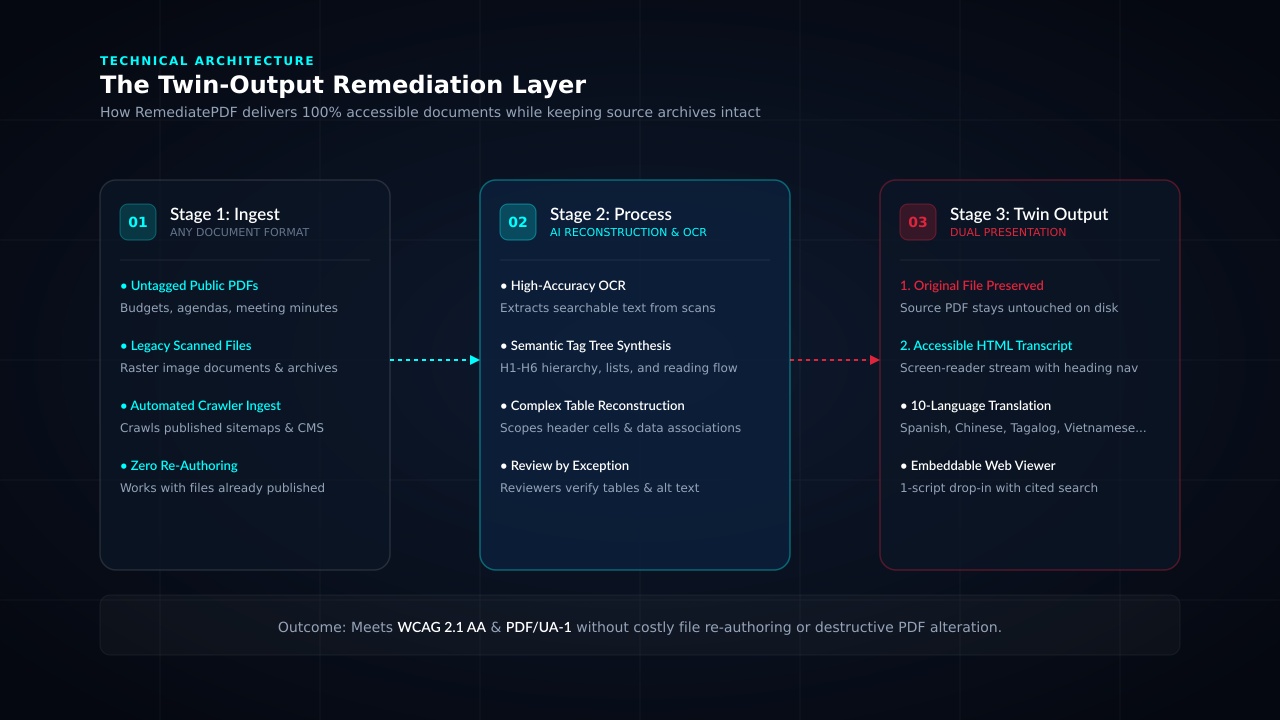
RemediatePDF bypasses this instability by adopting a twin-output architecture:
+-----------------------------------------------------------------+
|               REMEDIATEPDF TWIN-OUTPUT ARCHITECTURE              |
+-----------------------------------------------------------------+
| Input: Legacy PDF Archive / Scanned Public Notices               |
|                                                                 |
| Engine: Automated Tagging Engine + OCR + Exception Review        |
|                                                                 |
| Twin Output Delivery:                                           |
|   1. Original PDF File  -> Stays 100% untouched as source record|
|   2. Accessible Layer   -> Semantic HTML transcript + web viewer|
+-----------------------------------------------------------------+
1. The Original File Remains the Source of Truth
Legal and compliance officers are understandably hesitant to overwrite published documents that have served as official records. With RemediatePDF, the original PDF remains completely intact. It stays hosted in place, retains its original cryptographic checksum, and remains available for direct download by any user who requires the original layout.
2. The Accessible HTML Transcript Provides True Semantics
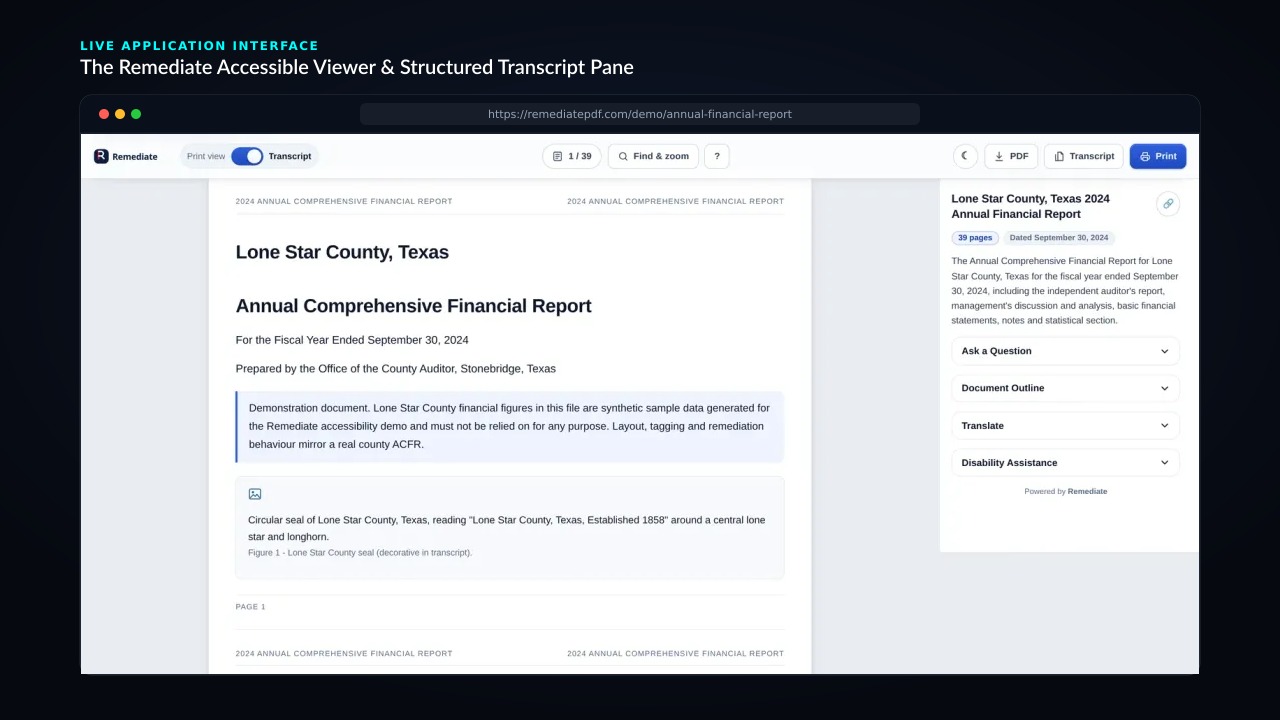
Alongside the original document, RemediatePDF compiles a structured HTML transcript. Assistive technologies, including NVDA, JAWS, and Apple VoiceOver, parse semantic HTML with significantly higher consistency than complex PDF tag trees. Headings follow strict H1 through H6 nesting, tabular data maps columns to row headers, and non-text elements receive descriptive alternate text.
This approach satisfies both sides of the compliance equation: legal teams preserve unblemished archival records, while people with disabilities receive an accessible, responsive reading experience that works across desktop and mobile browsers.
Core Capabilities and Features
RemediatePDF combines automated document analysis with practical publishing controls designed for production teams:
1. Automated Tag Tree and Reading Order Generation
Untagged PDFs lack structural boundaries, forcing assistive screen readers to voice text in arbitrary visual coordinates. RemediatePDF reconstructs reading order sequentially, separating multi-column editorial layouts, footers, running headers, and margin annotations into clean, logical streams.
2. High-Accuracy OCR for Scanned Documents
Historical meeting minutes, municipal ordinances, and archived contracts are frequently uploaded as flattened raster images without selectable text. RemediatePDF runs high-resolution optical character recognition (OCR) across every page, generating an accurate text layer so scanned documents become fully searchable, copyable, and readable by assistive devices.
3. Ten-Language Machine Translation
Federal executive orders and state laws increasingly mandate meaningful access for limited English proficient (LEP) communities. RemediatePDF includes integrated translation across ten languages:
- Spanish
- Simplified Chinese
- Tagalog
- Vietnamese
- Arabic
- French
- Korean
- Russian
- German
- Haitian Creole
Each translated transcript applies proper HTML language attributes (lang="es", lang="tl") and bidirectional text rules (dir="rtl" for Arabic), ensuring assistive voice synthesizers pronounce vocabulary accurately.
4. Embeddable Accessible Viewer with Cited Search
RemediatePDF deploys via a single lightweight script tag. The embeddable viewer provides:
- Keyboard-only navigation with visible focus indicators.
- In-document keyword search with instant cited answers linked to exact source pages.
- Dynamic text resizing and contrast adjustments without horizontal scrolling.
- Skip links, landmark regions, and live announcements that pass automated accessibility linters on every build.
5. Review by Exception
Automation handles 85% of repetitive document labor, including tag scaffolding, language metadata, OCR, and reading flow. Reviewers spend their time on items requiring human editorial discretion, such as interpreting complex multi-axis financial charts, confirming ambiguous table scopes, or reviewing decorative figure artifacts.
Document Processing Stages in RemediatePDF:
[Document Ingest] -> [Automated OCR & Layout Detection]
                  -> [Semantic Tag Tree Generation]
                  -> [Exception Review Panel (Tables/Alt-Text)]
                  -> [Dual Publishing: Original PDF + Live Transcript]
RemediatePDF vs. The Top Three Alternatives
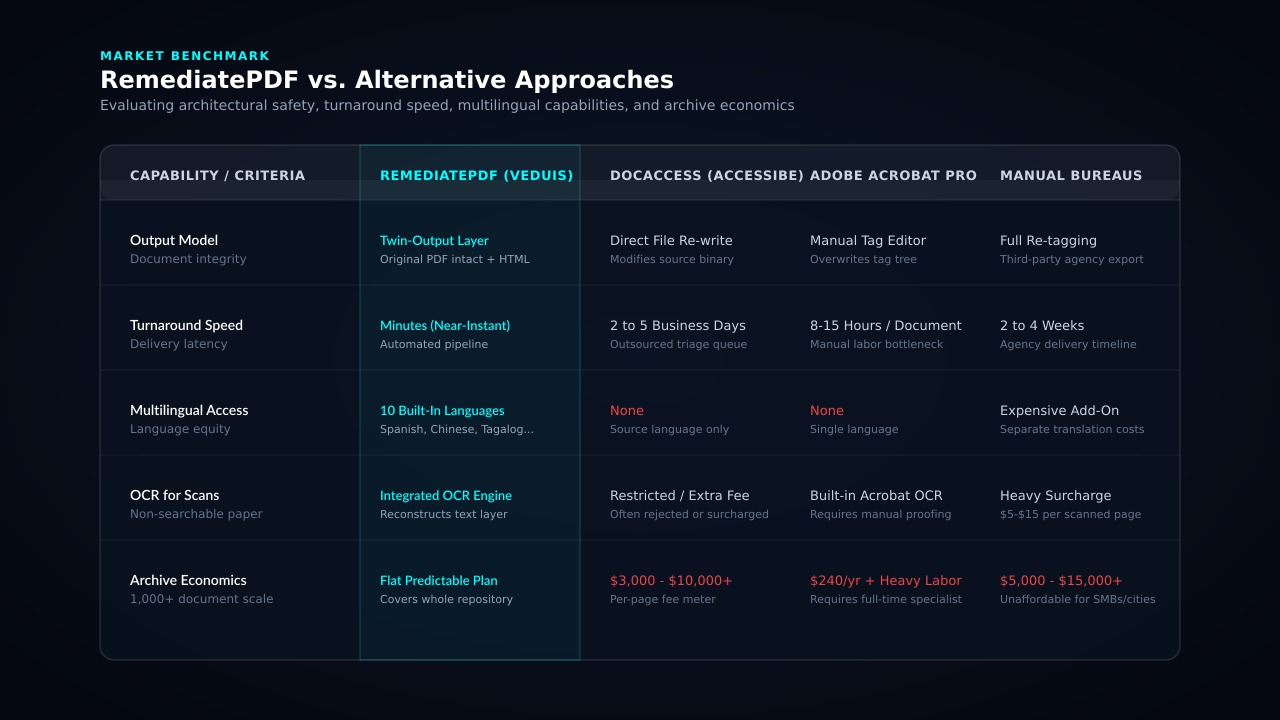
To understand how RemediatePDF fits into the compliance landscape, it is helpful to compare it against the three dominant approaches currently used in the market: DocAccess by accessiBe, manual Adobe Acrobat Pro remediation, and traditional remediation service bureaus.
1. RemediatePDF vs. DocAccess (by accessiBe)
DocAccess operates primarily as an outsourced remediation add-on. Users submit documents through a portal, and accessiBe returns a modified PDF file after several days.
Key distinctions:
- Cost Structure: DocAccess charges per-page rates ranging from $3 to $10+ per page or imposes strict monthly page ceilings. RemediatePDF is scoped around predictable program pricing, allowing organizations to remediate extensive document libraries without fear of per-page billing surprises.
- Architectural Safety: DocAccess rewrites the PDF binary. If automated heuristics mislabel a table cell or scramble a page, the file must be sent back for manual revision. RemediatePDF keeps the original file safe while presenting a live, editable transcript that reviewers can refine in seconds.
- Multilingual Support: DocAccess returns documents only in their original source language. RemediatePDF provides instant multilingual transcripts in ten languages at no additional charge.
- Reading Interface: DocAccess provides no interactive viewer or cited search mechanism; users simply download another static PDF. RemediatePDF provides an embeddable, keyboard-operable reader that integrates into any website or CMS.
2. RemediatePDF vs. Adobe Acrobat Pro
Adobe Acrobat Pro is the desktop standard for manual document repair. While powerful for individual files, Acrobat was never designed as an enterprise archive remediation pipeline.
Key distinctions:
- Labor Intensity: Remediating a 40-page financial report in Acrobat requires manually assigning container tags, ordering tags in the Tags tree, verifying table scopes in the Table Editor, and marking artifacts. This workflow routinely consumes 6 to 12 hours of skilled staff time per document. RemediatePDF completes initial scaffolding in under two minutes.
- LENIENT Checker Blind Spots: As detailed in our practitioner analysis of PDF accessibility checkers compared, Acrobat’s built-in accessibility checker routinely passes files with severe structural violations, including missing table scopes and absent PDF/UA identifier metadata. RemediatePDF validates semantic structure against WCAG 2.1 AA benchmarks.
- Desktop Requirement: Acrobat requires individual desktop seat licenses and dedicated operator training. RemediatePDF runs entirely in the cloud with zero client software installation.
3. RemediatePDF vs. Traditional Remediation Service Bureaus
Service bureaus (such as AbleDocs, CommonLook Service, or Level Access) rely on offshore labor pools to manually retag documents.
Key distinctions:
- Turnaround Latency: Service bureaus routinely require two to four weeks to process document batches. For organizations publishing weekly council agendas or daily public notices, multi-week turnaround times violate statutory transparency rules. RemediatePDF delivers transcripts in minutes.
- Prohibitive Pricing: Agency pricing ranges from $5 to $15+ per page. A municipal archive with 5,000 pages of public documents would cost between $25,000 and $75,000 to remediate through a bureau. RemediatePDF delivers full archive coverage at a fraction of that expenditure.
- Revision Friction: Whenever a document receives an addendum, amendment, or correction, service bureaus charge the full per-page rate again. With RemediatePDF, re-processing updated documents is instantaneous.
Feature Comparison Matrix
| Capability / Evaluation Criteria | RemediatePDF (Veduis) | DocAccess (accessiBe) | Adobe Acrobat Pro | Traditional Service Bureaus |
|---|---|---|---|---|
| Architecture | Twin-Output Layer (Untouched PDF + HTML) | Direct Binary Re-write | Manual Desktop Tagging | Full File Retagging |
| Turnaround Time | Minutes (Near-Instant) | 2 to 5 Business Days | 6 to 12 Hours / Document | 2 to 4 Weeks |
| Scanned Document OCR | Automated High-Accuracy OCR | Extra Fee / Often Restricted | Built-in (Requires Manual Proofing) | $5 to $15 / Scanned Page |
| Multilingual Translation | 10 Built-In Languages | None | None | Expensive Separate Service |
| Interactive Web Viewer | Yes (With Cited Search & Controls) | No (Download Only) | No (Requires Adobe Reader) | No (Download Only) |
| Archive Pricing Model | Predictable Flat Program Pricing | Per-Page Metered Fees | $240/yr Seat + Heavy Labor | $5 to $15 per Page |
| Technical Standard | WCAG 2.1 AA & PDF/UA-1 | Proprietary / Variable | Proprietary Adobe Check | WCAG / PDF/UA Certified |
Statutory Enforcement Milestones and Planning
Understanding the statutory enforcement calendar clarifies why proactive document remediation cannot be postponed.
The Department of Justice interim rule confirmed the two-tier compliance schedule for Title II public entities:
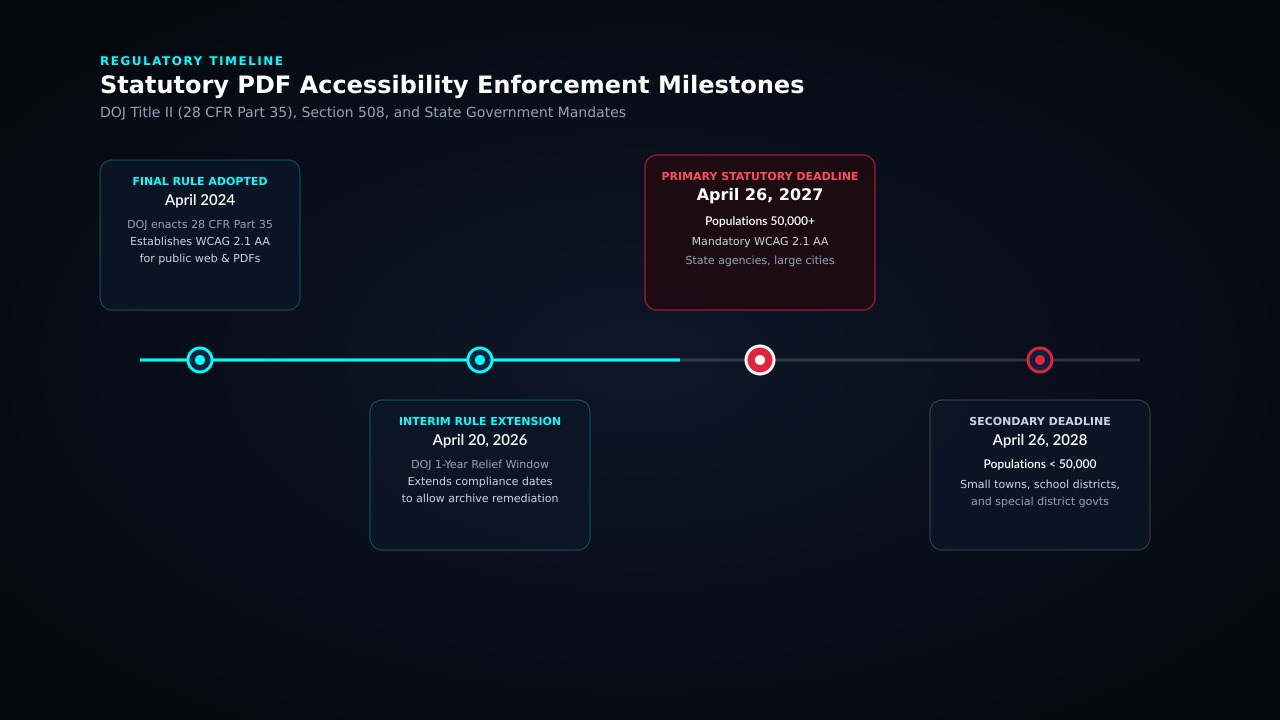
- April 26, 2027: Mandatory WCAG 2.1 Level AA conformance for state agencies, counties, cities, and public entities serving populations of 50,000 or greater.
- April 26, 2028: Mandatory conformance for smaller municipalities, independent school districts, and special district governments.
For a detailed breakdown of these statutory timelines and their legal implications, review the ADA Title II PDF compliance guide published by the Remediate team.
While the regulation provides limited exceptions for pre-existing archived content, those exceptions apply only to documents created before the rule’s publication that are not currently used to conduct agency business. Any document used to apply for a permit, access a public benefit, understand a budget, or participate in a civic meeting must be accessible upon request, and proactive remediation is the only legally defensible posture.
How to Get Started with RemediatePDF
Implementing RemediatePDF across an existing web property or document repository involves a straightforward three-step workflow:
- Repository Inventory: Our team crawls your published website to identify every public PDF, index page counts, flag scanned documents requiring OCR, and establish an operational remediation baseline.
- Automated Layer Generation: RemediatePDF processes document batches, constructing tag hierarchies, generating OCR layers for scans, building multilingual transcripts, and preparing embeddable viewer endpoints.
- Embed and Verify: Add our single script tag to your CMS templates. Your public documents immediately gain the accessible reader, keyboard controls, and search interface, while your original PDF files remain permanently available.
For organizations already utilizing our compliance solutions, RemediatePDF integrates directly alongside our web accessibility monitoring tools, creating unified coverage across HTML web pages and document repositories.
Summary
Inaccessible PDFs represent one of the largest remaining compliance liabilities for public entities and commercial organizations. Legacy approaches forced teams to compromise between prohibitive vendor costs and unsustainable manual labor.
RemediatePDF resolves that dilemma. By combining automated tag reconstruction, built-in OCR, multilingual transcripts, and an embeddable reader, RemediatePDF allows organizations to achieve WCAG 2.1 AA and Section 508 compliance across their entire document library while preserving original source files.
To see the platform in action and test an interactive document transcript, visit RemediatePDF or inspect our compliance solutions across the Veduis platform.